Data structures, alongside algorithms expressed as operations, are a fundamental
component of every computer program. When building applications, we choose structures
that will be best suited for processing data within our adopted model.
Data Structures
A data structure is a way of organizing data in memory accessible to a computer
program. Depending on the problem, we choose – alongside appropriate algorithms – such
structures that will allow us to solve it most efficiently.
An example of a data structure matched to needs might be a binary tree used in the
implementation of a compression algorithm. Data structures are abstract objects with
characteristics that can be expressed using various data types.
A data type is, in turn, a class of values with shared
properties, e.g., possible ranges, sizes of occupied memory space, or ways of
representing information. As with data types, we may also deal with selecting them
appropriately for the problem being solved. For instance, mathematical computations are
more efficiently performed on numeric types represented in memory as integers rather than
on character strings representing numbers alphabetically (although this is possible and
sometimes used, e.g., in calculations operating on truly large values). From the
compiler’s point of view, the type of a given value is its metadata – an annotation
about how to handle it during translation from source code to machine code.
It is worth keeping in mind that modern computing devices can operate exclusively on
integers, so ways of expressing data with other characteristics (e.g., strings,
floating-point numbers, fractions, or boolean values) in the form of these very integers
are needed. In this case, data types help mark certain classes of values so that the
compiler or interpreter can subsequently select appropriate methods for representing them
in the aforementioned numeric form. For example, a character string will be represented
as a sequence of bytes or multi-byte structures, and the functions operating on it, when
necessary, will use the language’s built-in mechanisms for transparent conversion to
alphabet symbols corresponding to the values.
Characteristics of Data Structures in Clojure
Persistent Structures
The data structures built into Clojure are persistent. This means that making changes to them always involves creating new
objects while preserving the original versions. We thus deal with a certain kind of
change history.
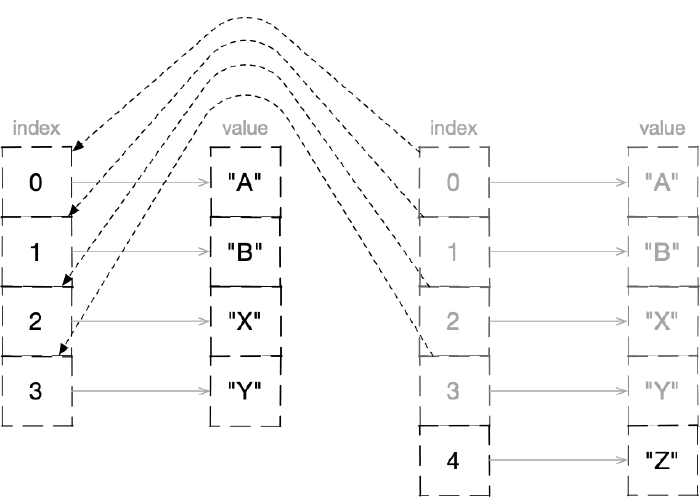
At the level of the language’s internal mechanisms, complex persistent structures undergo
certain modifications to express changes occurring over time. This works as follows: when
a change is introduced to a persistent data structure, an entirely new version of it is
created, but rather than copying all elements from the previous one (which would be
inefficient), the resulting object contains references to individual elements or regions
of the original structure’s version. This technique is called structural sharing.
After adding an element to a vector, a new object is created that shares most of the structure with the previous one
The complex, built-in structures of Clojure rely on the mentioned sharing, which is
realized through the implementation of wide-branching trees equipped with indexes that
speed up searching.
Immutable Data
Based on persistent structures, it is possible to support so-called immutable data,
that is, data that does not change in its memory location. Performing operations on
values causes new values to be created without modifying existing memory
regions. If we were dealing with a strongly imperative language, we would say that a
variable, once assigned a value, can no longer be modified.
Although internally we deal with data sharing within persistent structures and certain
modifications of references to changed fragments, these processes are safely isolated and
hidden from the programmer in the language implementation.
From the program author’s perspective, an operation performed on a persistent structure
yields an entirely new object. An example would be a large set to which we add one
element. As a result of such an operation, a separate collection of elements, enriched
with the added value, will come into being in the program, yet “under the hood” we are
dealing with the sharing of parts of the tree structure between the original set and its
derivative. This saves memory and time.
Reference Types
A significant exception to the rule of data immutability in Clojure are the so-called
reference types. We can overwrite their in-memory contents, but this is done using
appropriate mechanisms for inter-thread isolation and change management. What does this
mean in practice? If there is a need to use a fixed name to represent mutable data, then
objects of such types exist that will enable this and will additionally handle exceptional
situations, e.g., simultaneous access to the currently expressed value by multiple
threads at the same time.
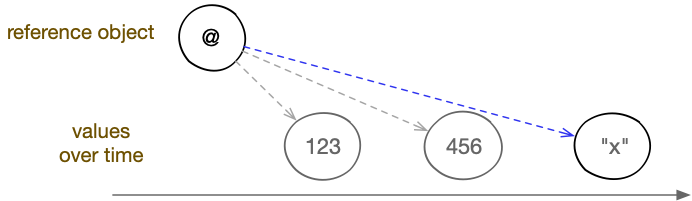
Reference objects do not themselves store values but rather – as the name suggests –
enable referencing other data. One could also say they allow the creation of
constant identities expressing changing states. What gets updated is
precisely the reference. At one moment it may point to a given value, and at the next to
a completely different one. The mutable part (the memory region subject to modification)
is minimized, making change management easier.
Reference types allow pointing to values that change over time
In Clojure, thanks to reference types, we are able to control the rules for data
exchange between concurrently executed activities, as well as globally (throughout the
program) identify selected in-memory objects, e.g., functions visible within a
namespace or important application settings.
The choice of a specific reference type will depend on how we want to operate on data in
a multi-threaded context:
For states that change rarely, we will use the Var type, which by default
ensures isolation of current values between threads. Objects of this type undergo
automatic dereferencing, meaning that referring to their symbolic name is enough to
learn the current value.
For handling identities whose states may be changed by multiple threads,
and we need only one thread to be able to modify them at a given quantum of time, we
will use the Atom type.
If the order of updating shared state is not important to us (e.g., for event handling
messages) and we do not want update operations to be blocking, we will choose the
Agent type.
More complex operations requiring coordinated handling of multiple values will require
the Ref type, which uses Software Transactional Memory.
Besides the above-mentioned, we will find in Clojure a few other reference types:
Future – used for performing computations in a thread other than the
current one; the current thread is blocked only when the result is read (dereferenced);
Promise – serving a similar purpose to Future, but with the ability to
choose in which thread the current value will be set;
Delay – used for synchronously deferring evaluation, which will be carried
out upon the first read attempt;
Volatile – resembles Atom, but due to the lack of guarantee that
operations will be atomic, it is used for modifying the current value within a single
thread.
It is worth noting that in Clojure we primarily deal with operating on bindings of
symbolic names or reference types to values, rather than on variables. Values are
immutable, and the way to create new ones is to perform operations on existing ones,
retrieve them from the environment, or place them literally in the program code.
If the results of operations performed on data are to be memorized and identified
(tracked) in some way, one can use bindings to create identities that
will express series of changes. There are two ways to do this: the first involves binding
a symbolic name to a specified value (e.g., using the let form), and the second
involves creating a reference object and setting its current value, which can then be
replaced by updating the reference.
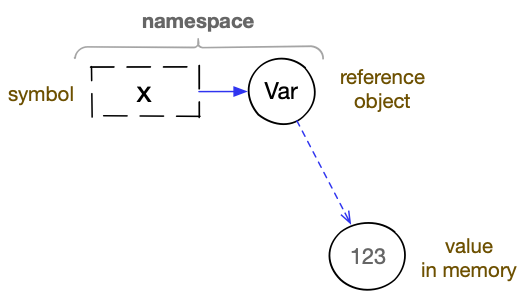
In practice, we will very often encounter situations where both of the above-mentioned
approaches are used simultaneously. For example, to create a globally visible value with
a fixed name (the equivalent of a variable) in a program, we will use a symbolic
identifier. It will be bound in a namespace to a reference object of the
Var type, and only the reference contained within it will point to a specific
value.
A global variable in Clojure is based on binding a symbol to a reference object of type Var and binding that object to a current value
Two questions arise here. First: would not just the namespace and an association of a
symbol with a value in memory suffice? Yes, that would be possible, but then we would
introduce conventional global variables into the language – a construct that requires
“arming” with appropriate control and isolation mechanisms when the program is to run on
multiple threads. Additionally, the kinds of these mechanisms would have to be matched to
the types of specific variables. Without this, or in the case of incorrect implementation
of concurrency patterns by the programmer, problems that we face in the imperative
paradigm could arise: race conditions, deadlocks, etc.
The next issue is the seemingly somewhat complicated presentation of the entire
operation of naming global values. First, the symbolic identifier must be assigned to a
reference object in a namespace, and then the current value of the reference should be
set. Fortunately, we do not have to (although we can) manage this process in such detail,
because we have at our disposal appropriate macros and special forms, e.g., def
and defn.
(def x 1)
; => #'user/x

(defn function [] 1)
; => #'user/function
In Clojure, we also deal with direct association of identifiers with values, but this
occurs within a limited lexical scope, specifically within the body of the
previously mentioned let construct. In such cases, the mapping of a symbol to a value
is temporarily (for the duration of evaluating the expressions placed in this form)
stored on a special bindings stack maintained for a given thread. Here, too, we may deal
with updating a value, which will involve overwriting the mapping (in the so-called
binding vector of the let form), but this will happen in a serialized manner: first the
first update, then the next, and so on. A lexical binding does not express shared state,
so it does not need special treatment in the context of multi-threading.
Updating a lexical binding
(let [x1; x bound to 1x(inc x); x bound to 2, because (inc x)x(inc x)]x); x bound to 3, because (inc x); => 3
(let [x 1            ; x bound to 1
      x (inc x)      ; x bound to 2, because (inc x)
      x (inc x)] x)  ; x bound to 3, because (inc x)
; => 3
Identifiers are data types that serve to name values, collection elements, or reference
objects. In Clojure, symbols or keywords are used as identifiers. The
former, when expressed literally, have special syntactic significance, meaning that a
process of name resolution is performed on them. Keywords are not automatically
transformed into the objects they identify, and they are used for creating enumeration
types and indexing the contents of associative structures.
Symbols
A symbol is a data type that helps identify values placed in memory by giving
them symbolic names. In Clojure, symbols can have special significance because they are
used by the language to handle bindings. Bindings, as we could read earlier, involve
associating symbols with constant values or with reference objects.
Let us recall: At the lexical level, a symbol is an element of the Clojure language that
begins with a non-numeric character and consists of alphanumeric characters. It may also
contain the characters *, +, !, -, _, ', ?, <, >, and =.
If a slash character (/) appears in the name of a literally expressed symbol, it will
be treated as a separator between the part specifying the namespace and the part
constituting the proper name. A dot (.) has a similar meaning, but it serves to
separate Java class names or namespace parts originating from packages.
Symbol Forms
There are three basic forms based on symbols:
An unquoted symbol placed in source code will create a so-called symbol form
expressing a reference to some value. Such a symbol will thus be evaluated, and
further computations will be based on the obtained result. The condition is, of course,
that a symbol of the given name was previously bound to a value. Examples of symbol
forms are:
name,
(name other-name).
A quoted symbol or one generated using the symbol function will create a constant
form representing the symbol object itself, not the value it identifies. We then
speak of a literal symbol. For example:
'name,
'(name other-name),
(quote name),
(symbol "name").
In certain constructs (e.g., in the let special form, the def special form, the
defn macro, or a function’s parameter vector) unquoted symbols will create so-called
binding forms. Through them it is possible to produce
bindings with values, that is, to name objects placed in memory, e.g., results of
executed operations, received arguments, or values expressed literally. For example:
It is worth remembering that unlike symbols known from other programming languages (and
unlike the data type called keywords), symbols in Clojure are not
automatically interned. This means that two symbols with the same name may exist,
represented by two different memory objects. For this reason, keywords are
better suited for indexing large associative structures.
Example of two identically named symbols
1(identical? 'a'a); are these two symbols the same object?2; => false ; they are not34(= 'a'a); are these two symbols equal?5; => true ; yes, they are
(identical? 'a 'a)   ; are these two symbols the same object?
; => false           ; they are not

(= 'a 'a)            ; are these two symbols equal?
; => true            ; yes, they are
Symbol Structure
Internally, symbols are objects consisting of:
a text label (name), expressed as a character string with the previously mentioned
properties;
an optional character string denoting the namespace to which some objects
identified by symbols should be assigned (if they use namespaces).
The symbol itself is not placed in any map representing a namespace at
the moment of creation, but it can be marked in such a way that other language constructs
(e.g., objects of the Var type) can later make use of this information.
Symbols that contain namespace information are called namespace-qualified symbols;
sometimes the jargon term fully-qualified symbols is also used.
Examples of namespace-qualified symbols
przestrzeń/nazwa'inna/inna-nazwa
przestrzeń/nazwa
'inna/inna-nazwa
Symbols themselves do not store references to the values that are identified with
their help. Their usefulness in this regard lies in the fact that symbol forms are
treated as identifiers during expression evaluation. At that point, various areas
(depending on context) where symbol-to-value mappings may reside are searched. Symbols in
Clojure therefore cannot be called a reference type.
Using Symbols
Thanks to the special treatment of symbols by the reader, we can express them simply by
placing their names in code. In such a form (symbol form) they will represent the values
with which they were previously associated. We are also able to use symbols as if they
were values themselves, using quoting or appropriate functions.
Symbol Forms
Symbol forms arise when unquoted strings appear in appropriate places in the source
code that meet the conditions needed for the reader to recognize them as symbol names.
Usage:
symbol,
namespace/symbol.
More precisely, symbol forms can be used to identify:
Java classes (they then begin with a dot character),
When the source code text is syntactically analyzed by the reader, symbols are detected
based on the conditions that the strings representing them must satisfy. Immediately after
that, their in-memory representations are created as objects of type
clojure.lang.Symbol. It is this form that the evaluator will subsequently use to find
the values indicated by the symbols. The algorithm is as follows:
If the symbol has a namespace-qualified namespace, an attempt is made to learn the
value pointed to by the global variable bound to a symbol of the
same name in the given namespace.
If the symbol contains a Java package specification, an attempt is made to refer to the
class with the same name as the symbol name.
If the symbol name is the same as the name of a special form, its
object is returned.
If in the current namespace there is a mapping of the symbol to a Java class, the
object of that class is returned.
If we are dealing with a lexical scope (in a function body
or in a let construct or similar), the bindings stack assigned to the given
thread is searched to find a mapping of the symbolic name to an object placed on the
heap.
Finally, the current namespace is searched to find a mapping of a symbol with
the same name to a global variable and to learn the current value
pointed to by that variable.
If after performing the above steps no binding of any memory object to a symbol with a
name identical to the given one is found, a java.lang.RuntimeException exception is
raised with the message Unable to resolve symbol.
Constant Forms of Symbols
Symbols in constant forms are self-evaluating values. We can use them to represent
arbitrary data meaningful in the context of the application’s logic: naming configuration
elements, controlling flow, classifying other data, etc.
Usage:
'symbol,
(quote symbol),
(symbol symbol-name),
(symbol namespace-name symbol-name).
There are two ways to create constant forms of symbols: quoting and using the
functionsymbol.
Quoting involves using the quote special form or the apostrophe preceding the symbol
name, which is a reader macro expanded into an invocation of this form. A single symbol
quoted with quote will become a leaf of the abstract syntax tree during parsing, marked
as not intended for evaluation. When the evaluator recursively computes the values of the
tree’s expressions, for such a fragment it will simply return the symbol object without
attempting to find objects that might be identified by that symbol.
The symbol function allows creating symbols expressed by given names. It accepts one
mandatory argument, which should be a symbol name expressed as a character
string. Optionally, we can also pass it as the first argument a namespace
name expressed in the same way, if we want to create a namespace-qualified symbol. In the
two-argument version, the symbol name must then be given as the second argument. The
return value is a symbol object, which we can use in the program just like any other
value.
Effectively, using the symbol function and the quote special form will let us obtain
a symbol object. The difference between them lies in the phase of program processing in
which the object will be produced. In the case of quoting, the object will be created
already at the moment of syntactic analysis, while in the case of using symbol, at the
moment of returning from the function.
Examples of creating literal symbols
1(symbol "abc"); creating the symbol abc2(symbol "user""abc"); creating the symbol abc with namespace user3(quote abc); quoting creates symbols for corresponding names4'abc; syntactic sugar for quote
(symbol        "abc")  ; creating the symbol abc
(symbol "user" "abc")  ; creating the symbol abc with namespace user
(quote           abc)  ; quoting creates symbols for corresponding names
'abc                   ; syntactic sugar for quote
Let us remember that qualifying a namespace does not place the symbol in any namespace,
but simply writes the appropriate information into it, which mechanisms making use of
namespaces can later employ.
Using symbols in constant forms does not differ from using other values:
Examples of using the constant form of symbols
1(list 'chleb'mleko'ser); list of symbols2(quote (chlebmlekoser)); quoted list of symbols3'(chlebmlekoser); quoted list of symbols
(list 'chleb 'mleko 'ser)  ; list of symbols
(quote (chleb mleko ser))  ; quoted list of symbols
'(chleb mleko ser)         ; quoted list of symbols
Binding Forms of Symbols
Unquoted symbols also find application in expressing binding forms,
that is, during the creation of bindings (e.g., lexical bindings or function
parameters). We then speak of binding expressions, which include:
1;; global variable and function definitions: 2 3(def a5); global variable bound to a value 4(def a(fn [](+ 22))); global variable bound to a function 5(defn a[](+ 22)); global variable bound to a function 6 7;; parameter vectors: 8 9(fn [ab](list ab)); arguments of an anonymous function10(defn f[ab](list ab)); arguments of a named function1112;; binding vectors:1314(let [a5]a); lexical binding15(binding [a5]a); dynamic binding16(with-local-vars [a5]@a); local variable
;; global variable and function definitions:

(def  a 5)                  ; global variable bound to a value
(def  a (fn [] (+ 2 2)))    ; global variable bound to a function
(defn a     [] (+ 2 2))     ; global variable bound to a function

;; parameter vectors:

(fn     [a b] (list a b))   ; arguments of an anonymous function
(defn f [a b] (list a b))   ; arguments of a named function

;; binding vectors:

(let             [a 5]  a)  ; lexical binding
(binding         [a 5]  a)  ; dynamic binding
(with-local-vars [a 5] @a)  ; local variable
Creating Unique Symbols, gensym
Sometimes it becomes necessary to create a symbol that will be globally unique, meaning
its name will be unrepeatable. The function gensym serves this purpose.
Usage:
(gensym prefix?).
The gensym function accepts one optional argument, which should be a character string,
and returns a symbol. If no string is provided, a symbol with a unique name prefixed with
G__ is generated. If an argument is provided, it is used as the name prefix.
Examples of using the gensym function
1;; completely unique name23(gensym)4; => G__286256;; unique name with a given prefix78(gensym "siefca")9; => siefca2865
;; completely unique name

(gensym)
; => G__2862

;; unique name with a given prefix

(gensym "siefca")
; => siefca2865
Type Testing, symbol?
We can check whether a given object is indeed a symbol (a constant form of a symbol)
using the symbol? predicate.
Usage:
(symbol? value).
The function accepts one argument and returns true (if the given value is a
symbol) or false (if the given value is not a symbol).
Example of using the symbol? function
1(symbol? 'test); is test a symbol?2; => true ; yes, it is34(symbol? test); is the value identified by the symbol test a symbol?5; => false ; no, it is not
(symbol? 'test) ; is test a symbol?
; => true       ; yes, it is

(symbol? test)  ; is the value identified by the symbol test a symbol?
; => false      ; no, it is not
Qualification Testing
We can check whether a symbol contains a namespace using the predicates:
(simple-symbol? value) – is it a symbol without a namespace,
(qualified-symbol? value) – does it contain a namespace.
Examples of using the simple-symbol? and qualified-symbol? predicates
1(simple-symbol?'test); is test a simple symbol?2; => true ; yes, it is34(qualified-symbol?'x/test); does x/test have a namespace?5; => true ; yes, it does
(simple-symbol? 'test)       ; is test a simple symbol?
; => true                    ; yes, it is

(qualified-symbol? 'x/test)  ; does x/test have a namespace?
; => true                    ; yes, it does
Symbols as Functions
Symbols can be used as functions. They then serve as collection lookup forms. Lookup
functions based on symbols accept one mandatory argument, which should be a map
or a set.
Usage:
(symbol collection default-value?).
In the given structure, a search will be performed for the element whose key is the given
symbol, and if it is not found, the value nil or the value given as the second,
optional argument will be returned.
When an element is found in a map, the symbol function returns the value associated with
that symbol; when an element is found in a set, its value is returned.
Symbols (as well as collections) can optionally be equipped with metadata. These
are pieces of information that enable making certain annotations, that is, associating
additional, auxiliary values with objects, which can then be used to control program
behavior.
Some metadata entries are recognized and used by the language’s built-in
mechanisms. An example would be global variables, whose properties can be controlled
using metadata associated with the symbols used to name them. Objects of the Var type
can be equipped with the following metadata:
documentation strings added to functions (key :doc);
information about the file from which the function originates (key :file).
Metadata with self-named keys that do not collide with built-in ones can be used by the
programmer for their own purposes.
Metadata is stored in maps and represented as key–value pairs. Keys can be
arbitrary objects, but by convention keywords are most commonly used.
Metadata is not a constituent of the values of the objects to which it is
attached. Comparing two objects that are identical in terms of values but have different
metadata will yield logical true.
When creating global variables that are identified by symbols, the
metadata placed in those symbols is copied to Var objects.
Reading Metadata, meta
To retrieve a symbol’s metadata, use the meta function.
Usage:
(meta symbol).
The meta function accepts a symbol and returns a metadata map if metadata has been
assigned to the symbol, or nil otherwise.
Examples of using the meta function
1;; creating a global variable (a reference to the value 5) 2 3(def x5) 4 5;; no metadata for the value 5 (pointed to by the symbol) 6 7(meta x) 8; => nil 910;; no metadata for the symbol x1112(meta 'x)13; => nil1415;; there is metadata for the global variable1617(meta #'x)18; => { :ns #<Namespace user>,19; => :name x, :file "NO_SOURCE_PATH",20; => :column 1,21; => :line 1 }2223;; metadata expression, metadata present2425(meta '^:testingy)26; => {:testing true}
;; creating a global variable (a reference to the value 5)

(def x 5)

;; no metadata for the value 5 (pointed to by the symbol)

(meta x)
; => nil

;; no metadata for the symbol x

(meta 'x)
; => nil

;; there is metadata for the global variable

(meta #'x)
; => { :ns #<Namespace user>,
; =>   :name x, :file "NO_SOURCE_PATH",
; =>   :column 1,
; =>   :line 1 }

;; metadata expression, metadata present

(meta '^:testing y)
; => {:testing true}
Adding Metadata, with-meta
To set custom metadata on a symbol, you can use the with-meta function.
Usage:
(with-meta symbol metadata).
As the first argument, pass a symbol to the with-meta function, and as the second
a map containing keys and their assigned metadata values that should be assigned
to the symbol.
Example of using the with-meta function
(with-meta 'nazwa{:klucz"wartość"}); => nazwa
(with-meta 'nazwa {:klucz "wartość"})
; => nazwa
It is worth keeping in mind that metadata set in this way will be present only in the
symbol returned by this specific expression and will not be attached to the symbol we are
operating on, because like other values, it is immutable.
An important characteristic of handling symbols equipped with metadata is that some
objects identified by them copy the metadata when creating a binding. An example of
this behavior are the mentioned global variables.
To avoid confusion, one should remember the distinction between the metadata of symbols
identifying objects, the metadata of those objects, and even the metadata of objects
pointed to by objects (in the case of reference types, which will be discussed in more
detail in later chapters).
It is entirely possible and common that a symbol is not equipped with metadata, but the
object identified by it does have metadata assigned.
Metadata Expressions
In Clojure there is also a reader macro that invokes with-meta on the value placed to
its right.
Usage:
^:flag value,
'^:flag value,
^{ :key value ... } value,
'^{ :key value ... } value.
Using it involves the circumflex character, after which key–value pairs specifying
metadata follow in curly braces. If the metadata entry expresses the boolean value
true (i.e., it is a flag), the braces and value can be omitted, but one must
remember the colon before the key name.
Optionally, instead of a single key, a character string can be provided – in that case,
the key :tag will be set with the value of that string. In the case of metadata grouped
in curly braces, keys can be character strings, symbols, or keywords.
Examples of using the reader macro for setting metadata
1;; creating a global variable (a reference to the value 5) 2;; with a metadata flag set in the symbol 3 4(def ^:testingx5) 5; => #'user/x 6 7(meta #'x) 8; => { :ns #<Namespace user>, 9; => :name x, :file "NO_SOURCE_PATH",10; => :column 1,11; => :line 1,12; => :testing true}1314(def ^{:testing"label", :second123}x5)15; => #'user/x1617(meta #'x)18; => { :ns #<Namespace user>,19; => :name x, :file "NO_SOURCE_PATH",20; => :column 1,21; => :line 1,22; => :testing "label",23; => :second 123 }
;; creating a global variable (a reference to the value 5)
;; with a metadata flag set in the symbol

(def ^:testing x 5)
; => #'user/x

(meta #'x)
; => { :ns #<Namespace user>,
; =>   :name x, :file "NO_SOURCE_PATH",
; =>   :column 1,
; =>   :line 1,
; =>   :testing true}

(def ^{ :testing "label", :second 123 } x 5)
; => #'user/x

(meta #'x)
; => { :ns #<Namespace user>,
; =>   :name x, :file "NO_SOURCE_PATH",
; =>   :column 1,
; =>   :line 1,
; =>   :testing "label",
; =>   :second 123 }
Note: In the case of constant forms of symbols produced by quoting, the reader macro
should be placed after the quoting marker and before the symbol name for the metadata
setting to take effect.
Keywords (also called keys) are a data type in Clojure that resembles
symbols. Like symbols, keywords serve to identify other data, but when not placed
at the first position of a list S-expression, they are a
constant form (they evaluate to themselves). Keywords are not treated specially by
the reader and do not automatically identify other data.
Keywords are often used to label certain options or flags, as well as keys in
associative data structures. Two keywords with the same name are identical.
Keyword interning
It is worth remembering that, unlike symbols, keywords are interned, meaning
two keywords with the same name will internally be represented by the same memory
object.
Example demonstrating keyword interning
1(identical? :a:a); are these two keywords the same object?2; => true ; yes, they are34(= :a:a); are these two keywords equal?5; => true ; yes, they are
(identical? :a :a)      ; are these two keywords the same object?
; => true               ; yes, they are

(= :a :a)               ; are these two keywords equal?
; => true               ; yes, they are
The property demonstrated above allows us to use keywords, for example, as indices
in associative structures. First, we have certainty regarding comparison tests,
and second, we know that not too many objects containing textual identifiers will
be created in memory – we will benefit from automatic dictionary compression for
identical keywords.
Referential comparison of keywords using identical? is fast and is
encouraged for use in very frequently executed code paths, promising increased
performance across millions of calls. However, there are rare edge cases where
two keywords with the same name will not be the same object. First, we may
have a specifically configured environment, and second, a particular
implementation of the Clojure language (e.g., one not running on the JVM) may not
guarantee interning.
For example, if we use a modular container with classloader isolation, an
implementation of the Open Services Gateway initiative (OSGi) modularization
standard, we may have more than one classloader in the same JVM runtime
environment, each of which may load a separate clojure.jar (if provided). As a
result, the keyword interning mechanisms, and even object class comparison, may
operate in parallel across more than one separate thread and use more than one
name-mapping table. In such cases, identical? will not be our only problem,
because even comparison will stop yielding expected results for certain object
types.
On a more general level, that is, for Clojure outside the JVM, we may encounter a
different keyword handling implementation. For example, in ClojureScript, two
keywords with the same names are not identical, although their values are equal.
In that case, identical? will return false, but = will return true.
If we are certain that the environment we use always relies on a language
implementation that guarantees referential equality of keywords with the same
names, we can use identical? and enjoy increased performance. However, if we are
the authors of the code but do not know the conditions under which it will run, or
have no control over them (e.g., in the case of programming libraries), we should
not rely on this mechanism. We can then apply an optimization such as:
(def a :one)
(def b :one)

(or (identical? a b) (= a b))  ; => true
In the example above, we use the fast branch wherever possible (> 99.99% of
cases), but if the result is negative, an additional value comparison is
performed.
Keyword namespaces
Keywords can optionally contain information about assignment to a specific
namespace. We can then speak of namespace-qualified keywords.
It is worth using namespaces when the code we write may be used by others, and
creating keywords could disrupt the operation of their programs. If, for example,
the mere existence of a keyword object (created by using it at least once) is
checked and the program’s logic depends on it, then by creating a library that
uses keywords and which the author of such an application will use, we could
potentially affect its correct operation.
In literal notation, keywords may contain a slash character, which serves to
separate the namespace part from the actual keyword name.
Using keywords
Creating keywords, keyword
Keywords can be created using the keyword function.
Usage:
(keyword namespace? key).
In the single-argument variant, the function accepts a string specifying the
keyword name, and in the two-argument variant, two strings: the namespace
name and the keyword name.
The function returns a keyword object that is interned (if it did not exist, it is
created; if it already existed, its instance is returned).
Keywords can be created using a keyword literal in the form of notation with a
leading colon.
Usage:
:key,
:namespace/key,
::key,
::namespace/key.
Before the actual keyword name, we can place a namespace name separated by a
slash character. When the literal begins with a single colon, the specified
namespace does not need to be defined; we can therefore provide any string of
characters.
Two colons with a name containing a slash character will mean that we wish
the created keyword to undergo the process of resolving the namespace specified by
an alias in the current namespace. The created keyword will have its
qualified namespace set to the target namespace pointed to by the alias.
A special case is a keyword literal preceded by two colons without specifying a
namespace. The namespace will be set according to the value indicated by the
special dynamic variable *ns*, which denotes the current namespace.
Examples of keyword expressions
1:klucz; => :klucz 2:przestrzeń/klucz; => :przestrzeń/klucz 3 4(ns user); current namespace: user 5::klucz; => :user/klucz 6::user/klucz; => :user/klucz 7 8(ns siup); current namespace: siup 9::klucz; => :siup/klucz1011;; importing bindings from the clojure.string namespace12;; into the current namespace using alias s1314(require'[clojure.string:ass])1516::s/klucz; => :clojure.string/klucz
:klucz             ; => :klucz
:przestrzeń/klucz  ; => :przestrzeń/klucz

(ns user)          ; current namespace: user
::klucz            ; => :user/klucz
::user/klucz       ; => :user/klucz

(ns siup)          ; current namespace: siup
::klucz            ; => :siup/klucz

;; importing bindings from the clojure.string namespace
;; into the current namespace using alias s

(require '[clojure.string :as s])

::s/klucz          ; => :clojure.string/klucz
Type checking, keyword?
Checking whether an object is a keyword is possible using the keyword?
predicate.
Usage:
(keyword? value).
If the given value is a keyword, true will be returned; otherwise false.
We can check whether a keyword contains a namespace using the predicates:
(simple-keyword? value) – whether it is a keyword without a namespace,
(qualified-keyword? value) – whether it contains a namespace.
Examples of using the simple-keyword? and qualified-keyword? predicates
1(simple-keyword?:test); is test a simple keyword?2; => true ; yes, it is34(qualified-keyword?::x/test); does x/test have a namespace?5; => true ; yes, it does
(simple-keyword? :test)        ; is test a simple keyword?
; => true                      ; yes, it is

(qualified-keyword? ::x/test)  ; does x/test have a namespace?
; => true                      ; yes, it does
Searching for keywords, find-keyword
We can check whether a given keyword has been interned using the find-keyword
function.
Usage:
(find-keyword key).
The function allows us to look up a keyword that was previously created, e.g., by
referencing it.
Example of using the find-keyword function
1(find-keyword"słowo"); does it exist?2; => nil ; no34:słowo; first use interns the keyword5(find-keyword"słowo"); does it exist?6; => :przestrzeń/słowo ; yes
(find-keyword "słowo")  ; does it exist?
; => nil                ; no

:słowo                  ; first use interns the keyword
(find-keyword "słowo")  ; does it exist?
; => :przestrzeń/słowo             ; yes
It is also possible to search for keywords with qualified namespaces:
Examples of using find-keyword with namespaces
1(find-keyword"przestrzeń""słowo"); does it exist?2; => nil ; no34:przestrzeń/słowo; first use interns the keyword5(find-keyword"przestrzeń""słowo"); does it exist?6; => :słowo ; yes
(find-keyword "przestrzeń" "słowo")  ; does it exist?
; => nil                             ; no

:przestrzeń/słowo                    ; first use interns the keyword
(find-keyword "przestrzeń" "słowo")  ; does it exist?
; => :słowo                          ; yes
Keywords as functions
Keywords can be used as functions. They then accept one mandatory argument, which
should be a map or a set.
Usage:
(key collection default-value?).
A lookup will be performed in the given structure for an element whose key is the
specified keyword; if not found, nil will be returned or the value provided as
the second, optional argument.
When an element is found in a map, the keyword function returns the value
associated with that key; when an element is found in a set, it returns the
element’s value.
Since version 1.9, Clojure has been equipped with several functions that allow
checking the properties of identifiers (symbols and keywords).
Testing identifiers
We can check whether a given object is an identifier (a symbol or a keyword), as
well as what properties it has, using the following predicates:
(ident? value) – whether it is an identifier,
(simple-ident? value) – whether it is an identifier without a namespace,
(qualified-ident? value) – whether it is an identifier with a namespace.
Examples of using identifier predicates
1(ident?'test); is test an identifier? 2; => true ; yes, it is 3 4(simple-ident?'test); is test a simple identifier? 5; => true ; yes, it is 6 7(qualified-ident?'x/test); does x/test have a namespace? 8; => true ; yes, it does 910(ident?:test); is :test an identifier?11; => true ; yes, it is1213(simple-ident?:test); is :test a simple identifier?14; => true ; yes, it is1516(qualified-ident?:x/test); does :x/test have a namespace?17; => true ; yes, it does
(ident? 'test)              ; is test an identifier?
; => true                   ; yes, it is

(simple-ident? 'test)       ; is test a simple identifier?
; => true                   ; yes, it is

(qualified-ident? 'x/test)  ; does x/test have a namespace?
; => true                   ; yes, it does

(ident? :test)              ; is :test an identifier?
; => true                   ; yes, it is

(simple-ident? :test)       ; is :test a simple identifier?
; => true                   ; yes, it is

(qualified-ident? :x/test)  ; does :x/test have a namespace?
; => true                   ; yes, it does
Boolean values
Handling two-valued logic relies on the Boolean type (java.lang.Boolean),
whose objects can express the values true or false. These two symbols, in
symbolic forms, evaluate to objects of type Boolean, denoting logical true and
logical false, respectively.
Objects of type Boolean, despite expressing only two states, occupy at least 16
bytes in memory (due to the JVM object header). The primitive boolean type takes up
1 byte.
Using boolean values
Boolean values are, by convention, returned by functions whose names end
with a question mark. Such functions are called predicates.
In addition, there are functions specific to boolean values that allow creating,
casting, and checking them.
Conditional execution
In Clojure, special forms responsible for conditional execution of
computations (e.g., if) treat logical false (expressed by the atom
false) and the null value (expressed by the atom nil) identically. They
internally perform type casting of data of various types to boolean values
(similarly to the boolean function described below).
Examples of type casting in conditional constructs
(if true  'tak 'nie)  ; => tak
(if false 'tak 'nie)  ; => nie
(if nil   'tak 'nie)  ; => nie
(if 0     'tak 'nie)  ; => tak
Creating boolean values, boolean
Boolean values can be created not only by placing literally expressed values
true or false, but also by using the boolean function.
Usage:
(boolean value).
The function accepts a value of any type and performs casting to true or
false. The rule is that the returned value is true, unless nil or false
was provided as the argument.
The and macro is used for controlling program execution, allowing the expression
of logical conjunction.
Usage:
(and & expression...).
The macro evaluates the values of successive expressions given as its arguments
(in order of occurrence) as long as their value is logical true (not false
and not nil).
The returned value is the value of the last provided expression, or false or
nil if any of the expressions returned such a value and processing was
interrupted. When no arguments are provided, true is returned.
The or macro is used for controlling program execution, allowing the expression
of logical disjunction.
Usage:
(or & expression...).
The macro evaluates the values of successive expressions given as its arguments
(in order of occurrence) until the value of one of them is logical true (not
false and not nil).
The returned value is the value of the last processed expression. When no
arguments are provided, the or macro returns nil.
In Clojure, there are built-in higher-order functions that help operate on
boolean values returned by other functions or use predicates provided as logical
operators. They will be discussed in more detail in later chapters.
Numeric values can be expressed in Clojure in many ways, for example by using
numeric literals, which create atomic S-expressions that are constant
forms.
Numeric data types
Numbers in Clojure are handled by all numeric data types present in Java, plus
two additional types specific to this language. Some types can be expressed using
numeric literals, while others require providing an appropriate function that
returns an instance of the class responsible for handling them.
Byte:
class: java.lang.Byte,
range: from -128 to 127,
creation: (byte value);
Short:
class: java.lang.Short,
range: from -32,768 to 32,767,
creation: (short value);
Integer:
class: java.lang.Integer,
range: from -2,147,483,648 to 2,147,483,647,
creation: (int value);
Ratio:
class: clojure.lang.Ratio,
range depends on available memory,
creation: (rationalize value.decimal-value) or (/ dividend divisor),
literal: 1/2;
Long:
class: java.lang.Long,
range: from -263 to 263-1,
creation: (long value),
literals:
8 – decimal notation,
0xfe – hexadecimal notation,
012 – octal notation,
2r1101001 – binary notation,
36rABCDY – base-36 notation;
BigInt:
class: clojure.lang.BigInt,
range depends on available memory,
creation: (bigint value),
literal: 123123123123123123N;
BigInteger:
class: java.math.BigInteger,
range depends on available memory,
creation: (biginteger value);
BigDecimal:
class: java.math.BigDecimal,
range depends on available memory,
creation: (bigdec value),
literal: 10000000000000000000M;
Float:
class: java.lang.Float,
range: from 2-149 to 2128-2104,
creation: (float value);
Double:
class: java.lang.Double,
range: from 2-1074 to 21024-2971,
creation: (double value),
literals:
2.0
-1.2e-5.
For types with the same or similar properties that are both built-in Java types
and Clojure language types (the clojure.lang namespace), it is worth using the
latter due to performance optimizations.
Arithmetic operators
Arithmetic operators are functions that allow performing basic mathematical
operations on numeric types.
Usage:
variadic operators:
(+ & addend...) – sum,
(- minuend & subtrahend...) – difference,
(* & factor...) – product,
(/ dividend & divisor...) – quotient,
(min value & value...) – minimum,
(max value & value...) – maximum;
two-argument operators:
(quot dividend divisor) – quotient of integer division,
(rem dividend divisor) – remainder of division (may be negative),
(mod dividend divisor) – modulus (Gaussian method, sign of result depends on sign of divisor);
single-argument operators:
(inc value) – increment by one,
(dec value) – decrement by one.
Operators for large numbers
Some operations may lead to an integer overflow error. This results from
using integers, i.e., objects of type java.lang.Long, in arithmetic operations.
An overflow occurs when a given operation (e.g., addition or multiplication) would
produce a value greater than what this data type supports. To handle such cases,
Clojure provides additional operators that, when necessary, perform appropriate
casting to values expressed by types with wider ranges. These functions differ
from their regular counterparts by their symbolic names – they have an appended
apostrophe character at the end.
Usage:
variadic operators:
(+' & addend...) – sum,
(*' & factor...) – product;
single-argument operators:
(inc' value) – increment by one,
(dec' value) – decrement by one.
Unchecked overflow operators
At runtime, the Clojure language checks whether certain operations will
cause overflows or underflows. However, there are operator variants
intended for the Integer type that skip these checks.
The dynamic special variable named *unchecked-math* allows
changing the behavior of all conventional arithmetic operations so that overflow
checks will not be performed.
Comparison operators
Usage:
(= value & value...) – equal,
(== value & value...) – numerically equal,
(not= value & value...) – not equal,
(< value & value...) – less than,
(> value & value...) – greater than,
(<= value & value...) – less than or equal,
(>= value & value...) – greater than or equal,
(compare value value ) – compares values or collection elements.
Casting to numeric types is possible using the functions listed
earlier, which also serve to create numeric values.
Usage:
(byte value),
(short value),
(int value),
(long value),
(float value),
(double value),
(bigdec value),
(bigint value),
(num value),
(rationalize value),
(biginteger value).
Numeric type predicates
Using predicates, one can test various properties of numeric values.
Usage:
(zero? value) – whether the value is zero,
(pos? value) – whether the value is positive,
(neg? value) – whether the value is negative,
(pos-int? value) – whether the integer value is positive,
(neg-int? value) – whether the integer value is negative,
(nat-int? value) – whether the integer value is a natural number (incl. 0),
(even? value) – whether the value is even,
(odd? value) – whether the value is odd,
(number? value) – whether the value is a numeric type,
(ratio? value) – whether the value is a ratio (type Ratio),
(rational? value) – whether the value is a rational number,
(integer? value) – whether the value is an integer (excluding BigDecimal),
(decimal? value) – whether the value is of type BigDecimal,
(float? value) – whether the value is a floating-point number,
(double? value) – whether the value is a double-precision number,
Bitwise operators
Bitwise operations can be performed on numeric type data.
Usage:
variadic functions (min. 2 arguments):
(bit-and value value-2 & value...) – bitwise AND,
(bit-and-not value value-2 & value...) – AND with NOT,
(bit-or value value-2 & value...) – bitwise OR,
(bit-xor value value-2 & value...) – bitwise XOR;
two-argument functions:
(bit-test value index) – read the state of the bit at a given position,
(bit-flip value index) – toggle the bit at a given position,
(bit-set value index) – set the bit at a given position,
(bit-clear value index) – clear the bit at a given position,
(bit-shift-left value n) – left bit shift,
(bit-shift-right value n) – right bit shift,
(unsigned-bit-shift-right value n) – unsigned right bit shift;
single-argument functions:
(bit-not value) – bitwise NOT.
Pseudorandom numbers
Pseudorandom numbers are numeric values generated algorithmically (in the JVM using
java.util.Random) that should exhibit a uniform distribution over time
(non-repeatability). They are deterministic and should not be used for cryptographic
purposes.
Generating pseudorandom numbers, rand
The rand function is used to generate pseudorandom numbers.
Usage:
(rand upper-bound?).
The function accepts one optional argument indicating the upper bound of the range
from which the result should be drawn (defaults to 1 if no argument is provided).
This range is right-open (it does not include the value specified as the right
bound), and its first element is 0.
The value returned by the function is a floating-point number.
Integer pseudorandom numbers, rand-int
The rand-int function works similarly to rand, i.e., it generates a
pseudorandom number, but returns an integer.
Usage:
(rand-int upper-bound).
The function accepts one mandatory argument indicating the upper bound of the
range from which the result should be drawn. This range is right-open (it does
not include the value specified as the right bound), and its first element is 0.
Some functions and mechanisms used for handling numeric data types can be
configured. This is done using appropriate functions and special variables.
Overflow checks
During the source code compilation stage, checks are performed to determine
whether the addition, subtraction, multiplication, increment by one, decrement by
one, and rounding functions will return an overflow error. These checks can be
disabled by binding the special variable *unchecked-math* to the value true.
Example of binding the unchecked-math special variable
Note: Some numeric data types will still use overflow checks, because this
setting only applies to situations where all operands are built-in types. To
ensure that checks will not be performed, it is worth using optional static
typing through the type hinting mechanism.
Setting precision, with-precision
For BigDecimal type data, we can control the precision and rounding mode of
results. The with-precision macro is used for this purpose.
Usage:
(with-precision precision value),
(with-precision precision :rounding mode value).
Its first argument sets the number of significant digits (precision), the optional second argument
sets the rounding mode, and the last argument is the expression to be computed
using these settings.
Individual characters in Clojure are represented by objects of the java.lang.Character
class. They are multibyte characters and can be letters of the Unicode alphabet.
Creating characters
Characters can be created using appropriate functions or character literals.
Character literals
Using the symbolic notation with a backslash, we can literally express individual
characters.
Usage:
\character,
\special-character.
Examples of literal character creation
1\d; character literal2; => \d34\newline; character literal for a special character (newline)5; => \newline
\d               ; character literal
; => \d

\newline         ; character literal for a special character (newline)
; => \newline
Character from code, char
Using the char function, we can create a character by providing its code compliant
with the UTF-16BE standard.
Usage:
(char character-code).
The function takes one argument, which should be the numerically expressed character
code, and returns the character with the given code. The returned character may be
internally represented as a multibyte value.
Example of using the char function
1(char 100); creating a character with code 100 (letter d)2; => \d34(char 261); letter ą5; => \ą
(char 100)       ; creating a character with code 100 (letter d)
; => \d

(char 261)       ; letter ą
; => \ą
Character from string, get
The get function allows us to retrieve any character from a given string.
Usage:
(get string position).
The first argument passed to the function should be a string, and the second should
be the position of the character we want to retrieve (starting from 0).
The function returns a character or the value nil if it was unable to retrieve the
character (e.g., due to an invalid position number).
Example of retrieving individual characters from strings
(get "siefca"2); => \e
(get "siefca" 2)
; => \e
Character sequences
It is worth noting that strings in Clojure can be treated as character sequences
and can be used with functions designed for sequences.
Below is a list of selected sequential operations that produce a character or a set
of characters from a string.
Usage:
(seq string) – creates a character sequence,
(first string) – retrieves the first character,
(last string) – retrieves the last character,
(rest string) – retrieves all characters except the first,
(nth string index) – retrieves the specified character,
(rand-nth string) – retrieves a random character,
(apply function string) – substitutes each character as a function argument,
(every? predicate string) – checks a condition for each character,
(reverse string) – reverses the order of the character sequence,
(frequencies string) – counts character occurrence frequencies,
(when-first [char string ...] expression) – evaluates for the 1st character.
Generating an escape sequence for characters with special meaning is possible
using the char-escape-string function.
Usage:
(char-escape-string character).
The first argument should be a special character (expressed literally or in another
way).
The function returns an escape sequence for the given special character, or nil if
no escape sequence exists.
Examples of using the char-escape-string function
1;; no escape sequence for the letter c 2 3(char-escape-string\c); => nil 4 5;; escape sequence for newline 6 7(char-escape-string\newline); => "\\n" 8 9;; escape sequence for backspace1011(char-escape-string\backspace); => "\\b"
;; no escape sequence for the letter c

(char-escape-string \c)          ; => nil

;; escape sequence for newline

(char-escape-string \newline)    ; => "\\n"

;; escape sequence for backspace

(char-escape-string \backspace)  ; => "\\b"
Names of special characters, char-name-string
Retrieving names for characters with special meaning is possible using the
char-name-string function.
Usage:
(char-name-string character).
The function takes one argument, which should be a special character (expressed
literally or in another way), and returns the name of that character, or nil if
no character was provided or the given character is not a special character.
Comparing whether a given character should come first, last, or be equal to
another character in terms of ordering (useful for sorting) is possible using
the compare function.
Usage:
(compare character-1 character-2).
The function takes two arguments and returns -1 (or a lesser value) when the first
argument should be placed before the second, 1 (or a greater value) in the opposite
case, and 0 if both characters can occupy the same (equal) position. The alphabetical
position of characters is taken into account.
Strings in Clojure are objects of the java.lang.String class. The language provides
appropriate functions to help handle them, and additionally, Java methods operating
on strings can be used.
Strings can also be treated as character sequences, allowing the use of functions
that operate on sequences. More about this access method can be found in the section
dedicated to character sequences(#Sekwencje znakowe).
Creating strings
There are several ways to create strings. You can use a text literal, use the str
function, or another function that returns a string based on input data.
Strings from text literals
Usage:
"This is a string",
"".
Example of using a text literal
1"This is a string"2; => "This is a string"34""5; => ""
"This is a string"
; => "This is a string"

""
; => ""
Strings from a series of values, str
The str function takes zero or more arguments. It attempts to convert
each value to a string, and then concatenates all obtained strings into one, which
is returned.
Usage:
(str & value...).
The function takes zero or more arguments of any values and returns a string that
is the concatenation of the given values converted to strings.
If no arguments are provided, str returns an empty string.
The format function takes at least one argument, which should be a format string
compliant with the syntax used by java.util.Formatter (corresponding to the syntax
used in the
sprintf function from the
C standard library).
Usage:
(format format-string & value...).
For each control sequence specified in the first argument (the format string) that
requires input data, a corresponding argument expressing the value to be substituted
must be provided.
The function returns a processed string constructed according to the given
formatting pattern.
Strings can be created from data originating from a captured output stream (usually
associated with the standard output descriptor). The with-out-str macro serves
this purpose.
Usage:
(with-out-str & expression...)
The macro takes a set of expressions that will be evaluated (computed). If any of them
generates a side effect in the form of writing to the standard output stream, the
data will be captured and placed in the returned string.
Example of using the with-out-str macro
;; standard output of the expression into a string(with-out-str (println "Baobab")); => "Baobab\n"
;; standard output of the expression into a string

(with-out-str (println "Baobab"))
; => "Baobab\n"
Strings from values, pr-str
The pr-str function works similarly to str and serves to convert given values to
their symbolic representations (S-expressions). It works as if pr were used, but
the result is not displayed – instead, it is returned as a string.
(pr-str & value...)
The function takes zero or more values and casts each of them to a string.
The returned value is the concatenation of textual representations of the values,
separated by single space characters.
Example of using the pr-str function
(pr-str [1234]'(1)); writes the representation of objects into a string; => "[1 2 3 4] (1)" ; as returned by the pr function
(pr-str [1 2 3 4] '(1))  ; writes the representation of objects into a string
; => "[1 2 3 4] (1)"    ; as returned by the pr function
Strings from values, prn-str
The prn-str function works similarly to str and serves to convert given values to
their symbolic representations (S-expressions). It works as if prn were used, but
the result is not displayed – instead, it is returned as a string.
(prn-str & value...)
The function takes zero or more values and casts each of them to a string.
The returned value is the concatenation of textual representations of the values,
separated by single space characters. The string is terminated with a newline
character.
Example of using the prn-str function
(prn-str [1234]'(1)); writes the representation of objects into a string; => "[1 2 3 4] (1)\n" ; as returned by the prn function
(prn-str [1 2 3 4] '(1))  ; writes the representation of objects into a string
; => "[1 2 3 4] (1)\n"   ; as returned by the prn function
Strings from print result, print-str
The print-str function works like print, but instead of displaying the results,
it returns a string containing them.
(print-str & value...).
The function takes zero or more values and casts each of them to a string.
The returned value is the concatenation of textual representations of the values,
separated by single space characters.
Example of using the print-str function
(print-str "Ba"\o\b'ab); creates a string from the effect of calling print; => "Ba o b ab"
(print-str "Ba" \o \b 'ab)  ; creates a string from the effect of calling print
; => "Ba o b ab"
Strings from println result, println-str
The println-str function works like println, but instead of displaying the
results, it returns a string containing them.
(println-str & value...).
The function takes zero or more values and converts each of them to a string.
The returned value is the concatenation of textual representations of the values,
separated by single space characters.
Example of using the println-str function
(println-str "Ba"\o\b'ab); creates a string from the effect of calling println; => "Ba o b ab\n"
(println-str "Ba" \o \b 'ab)  ; creates a string from the effect of calling println
; => "Ba o b ab\n"
Comparing strings
Strings can be compared using generic operators.
Usage:
(= string & string...) – equal,
(compare string string ) – compares two strings lexicographically.
Retrieving the position of a given substring within a text is possible using the
clojure.string/index-of and clojure.string/last-index-of functions.
Usage:
(clojure.string/index-of string fragment start?)
– finds the position of the first occurrence,
(clojure.string/last-index-of string fragment start?)
– finds the position of the last occurrence.
The functions take two required arguments: a string and the sought text fragment.
The returned values are positions (counting from 0) at which the given substrings
can be found.
When the optional third argument start is provided, it should specify the position
from which the search will begin.
Examples of using the index-of and last-index-of functions
(clojure.string/index-of"Baobab was here.""b"); => 3(clojure.string/last-index-of"Baobab was here.""b"); => 5
(clojure.string/index-of      "Baobab was here." "b")  ; => 3
(clojure.string/last-index-of "Baobab was here." "b")  ; => 5
Counting characters
The count function
The count function counts characters in a string (including multibyte characters).
For strings, counting is performed in constant time (O(1)), because the .length() method of the String class is used.
Usage:
(count string).
The first argument should be a string, and the returned value is the number of
characters in that string.
(count "Baobab"); number of characters (even multibyte ones); => 6
(count "Baobab")  ; number of characters (even multibyte ones)
; => 6
Regular expressions
Regular expressions (abbr. regexps) are objects that allow describing patterns
for matching against text. Internally, they are represented by appropriately optimized
data structures, but when creating them, a human-readable textual notation is used.
Regular expressions can be used to check whether given strings or their parts match
specific patterns. We can also build operators that, based on regular expressions, will
replace matching text fragments with others or extract those fragments.
Regular expression literals
In Clojure, regular expressions can be created using the appropriate literal notation:
#"pattern",
where pattern is a string specifying the content of the expression compliant with
the format of the argument accepted by the
java.util.regex.Pattern
class constructor.
Creating from pattern, re-pattern
Creating a regular expression object from a textual representation of a matching
pattern is possible using the re-pattern function. The generated value is the
compiled form of the given textual representation of the expression, and using such
an object has a positive impact on CPU resource utilization. The regular expression
object can be used multiple times by passing it as an argument to functions that
operate on regular expressions.
Usage:
(re-pattern pattern).
The function takes a string representing a matching pattern and returns a regular
expression object.
Example of using the re-pattern function
(re-pattern "\\d+"); creating a regular expression#"\d+"; syntactic sugar
It is worth noting the double backslash, which removes its special meaning.
Creating a matcher, re-matcher
Creating a matcher object allows using functions that process strings with matching
patterns in the form of regular expressions. Thanks to it, the matching can be
reused in its already compiled, internal form. The matcher is a mutable Java object
that stores internal indices subject to change.
The re-matcher function is used to create a matcher object.
Usage:
(re-matcher expression string).
The function takes two arguments. The first should be a regular expression object,
and the second should be the examined string.
The returned value is a regular expression matcher object.
Calling the function from the example above will create an object of the
java.util.regex.Matcher class. The first argument passed to it is the regular
expression, and the second is the string to be matched against it. The created value
can then be passed as an argument to certain functions that extract matches,
e.g., re-find.
Warning: Internal structures of Matcher objects may change in an
uncoordinated manner, producing erroneous results.
Finding matches and groups, re-find
The re-find function finds matches of a given string against a regular expression
or matcher. It takes two arguments: a regular expression and a string. It can also
be used in a single-argument form – in that case, it takes a matcher object (of type
Matcher), and each invocation returns the next matching fragment.
Regular expressions can consist of groups, i.e., logical parts that contain
sub-patterns matching certain parts of the string. These groups can be nested. In the
case of a regular expression with groups, re-find will return a vector
whose individual elements correspond to successive matching groups. The exception is
the element at index zero, which contains the entire fragment of the string that
matches all patterns.
The re-find function internally makes use of the re-groups function described
below to return results.
Usage:
(re-find matcher),
(re-find expression string).
In the single-argument variant, the accepted argument is a regular expression matcher
object. In the two-argument variant, a regular expression object and the string to be
matched must be provided.
The returned value is the matched string fragment or a vector containing
the matches.
Example of using the re-find function
1;; returns the first match 2 3(re-find #"\d+""abc123def456") 4; => "123" 5 6;; returns matching groups 7 8(re-find #"(\d+)-(\d+)-(\d+)""000-111-222") 9; => ["000-111-222" "000" "111" "222"]1011;; naming a global matcher object1213(def matcher(re-matcher #"\d+""abc123def456"))14; => #'user/matcher1516;; repeating the matching three times1718(repeatedly319#(re-find matcher))20; => ("123" "456" nil)
;; returns the first match

(re-find #"\d+" "abc123def456")
; => "123"

;; returns matching groups

(re-find #"(\d+)-(\d+)-(\d+)" "000-111-222")
; => ["000-111-222" "000" "111" "222"]

;; naming a global matcher object

(def matcher (re-matcher #"\d+" "abc123def456"))
; => #'user/matcher

;; repeating the matching three times

(repeatedly 3
            #(re-find matcher))
; => ("123" "456" nil)
Warning: Using re-matcher is not thread-safe!
Reading matching groups, re-groups
The re-groups function allows reading the matching groups of a regular expression
that was most recently used.
Usage:
(re-groups matcher).
The function takes only one argument, which should be a matcher object, and returns
a vector of text fragments matching the groups.
If the last attempt to match a string against the expression resulted in nil, then
attempting to call re-groups will throw an exception.
Example of using the re-groups function
1;; global variable tel points to a matcher object 2 3(def tel(re-matcher #"(\d+)-(\d+)-(\d+)""000-111-222")) 4 5;; first perform matching 6 7(re-find tel) 8; => "000-111-222" 910;; reading matching groups as a vector1112(re-groups tel)13; => ["000-111-222" "000" "111" "222"]
;; global variable tel points to a matcher object

(def tel (re-matcher #"(\d+)-(\d+)-(\d+)" "000-111-222"))

;; first perform matching

(re-find tel)
; => "000-111-222"

;; reading matching groups as a vector

(re-groups tel)
; => ["000-111-222" "000" "111" "222"]
Warning: Using re-matcher is not thread-safe!
Matching, re-matches
The re-matches function allows checking whether a given string matches the pattern
represented by a regular expression.
The difference between re-find and re-matches is that the latter does not search
for partial matches. The given string must match the regular expression pattern in
its entirety.
Usage:
(re-matches expression string).
The function takes two arguments. The first should be a regular expression, and the
second a string.
The returned value will be a single string or a vector of strings if groups were used
(internally, the function uses re-groups). If there is no match, the value nil
is returned.
Thread-safe and consistent with the functional style is the use of
sequences (specifically lazy sequences) to represent matches of strings
against regular expression patterns. The re-seq function serves this purpose; it
internally uses the java.util.regex.Matcher.find() method and then uses re-groups
to generate the result.
Usage:
(re-seq expression string).
The function takes two arguments: a regular expression and a string, and returns a
lazy sequence of successive fragments matching the pattern.
Example of using the re-seq function
(re-seq #"[\p{L}\p{Digit}_]+""We will split this into words"); => ("We" "will" "split" "this" "into" "words")
(re-seq #"[\p{L}\p{Digit}_]+" "We will split this into words")
; => ("We" "will" "split" "this" "into" "words")
Quoting, re-quote-replacement
If the string used as a replacement in a clojure.string/replace call were generated
dynamically, it might be necessary to add escape sequences before patterns that
have special meaning. For example, we want to replace a certain word with an example
containing the notation $1, which when using regular expressions would be replaced
by the value of the first matching capturing group. In the case of a static string,
we would simply add a backslash (\$1) to remove the special meaning of the
notation. However, if the replacement were the result of program operation, we would
need to modify it by replacing special patterns with other ones. The
re-quote-replacement function can handle this for us.
Usage:
(re-quote-replacement string).
The first and only argument accepted by the function should be a string representing
the replacement that we want to use in other functions. The returned value is a
string in which patterns with special meaning in the context of regular expressions
have been quoted.
Example of using the clojure.string/re-quote-replacement function
1;; without removing special meaning 2 3(clojure.string/replace"Color red" 4#"(\w+) ([Rr]ed)" 5"$1 determined by the symbol $2") 6; => "Color determined by the symbol red" 7 8;; with removing special meaning 910(clojure.string/replace"Color red"11#"(\w+) ([Rr]ed)"12(str "$1 determined by the symbol"13(clojure.string/re-quote-replacement14" $1")))15; => "Color determined by the symbol $1"
;; without removing special meaning

(clojure.string/replace "Color red"
                        #"(\w+) ([Rr]ed)"
                        "$1 determined by the symbol $2")
; => "Color determined by the symbol red"

;; with removing special meaning

(clojure.string/replace "Color red"
                        #"(\w+) ([Rr]ed)"
                        (str "$1 determined by the symbol"
                             (clojure.string/re-quote-replacement
                              " $1")))
; => "Color determined by the symbol $1"
Transforming Strings
Capitalizing the first letter, capitalize
The function clojure.string/capitalize allows changing the first letter to
uppercase.
Usage:
(clojure.string/capitalize string).
The first and only argument should be a string, and the returned value is a string
whose first letter has been changed to uppercase and the remaining letters changed to
lowercase.
Example of using the clojure.string/capitalize function
(clojure.string/capitalize"john was here."); => "John was here."
(clojure.string/capitalize "john was here.")
; => "John was here."
Converting letters to lowercase, lower-case
Changing all letters to lowercase is possible using the function clojure.string/lower-case.
Usage:
(clojure.string/lower-case string).
The function takes one argument, which should be a string, and returns a new string
in which the appropriate characters have been transformed.
Example of using the clojure.string/lower-case function
The function clojure.string/escape allows adding escape sequences by replacing
specified characters with strings.
Usage:
(clojure.string/escape string map).
The first argument of the function should be a string, and the second a map
containing pairs where keys are characters and values are strings that should replace
them when found in the text.
Example of using the clojure.string/escape function
The function reverse from the clojure.core namespace works differently than
clojure.string/reverse, because it returns a sequence of characters in
reversed order. Such a sequence can then be converted to a string, e.g., using
apply or str.
Usage:
(reverse string).
The first argument should be a string, and the returned value is a
sequence of characters whose order has been reversed relative to the
order of the given string.
Removing whitespace characters (including newline characters) from both ends of a
string can be done using the function clojure.string/trim.
Usage:
(clojure.string/trim string).
The function takes a string as its first argument and returns its version with
whitespace characters and newline characters removed from its beginning and end.
Example of using the clojure.string/trim function
(clojure.string/trim" Baobab tu był. "); => "Baobab tu był."
(clojure.string/trim " Baobab tu był.     ")
; => "Baobab tu był."
Trimming from the left, triml
Removing whitespace characters (including newline characters) from the left side
of a string is possible thanks to the function clojure.string/triml.
Usage:
(clojure.string/triml string).
The function takes a string as its first argument and returns its version with
whitespace characters and newline characters removed from its beginning.
Example of using the clojure.string/triml function
(clojure.string/triml" John was here. "); => "John was here. "
(clojure.string/triml " John was here.     ")
; => "John was here.    "
Trimming from the right, trimr
The function clojure.string/trimr allows removing whitespace characters (including
newline characters) from the right side of a string.
Usage:
(clojure.string/trimr string).
The function takes a string as its first argument and returns its version with
whitespace characters and newline characters removed from its end.
Example of using the clojure.string/trimr function
(clojure.string/trimr" John was here. "); => " John was here."
(clojure.string/trimr " John was here.     ")
; => " John was here."
Trimming newlines, trim-newline
Removing newline characters from the right side of a string is possible using the
function clojure.string/trim-newline.
Usage:
(clojure.string/trim-newline string).
The function takes a string as its first argument and returns its version with
newline characters removed (from its end).
Example of using the clojure.string/trim-newline function
(clojure.string/trim-newline"John was here.\n"); => "John was here."
(clojure.string/trim-newline "John was here.\n")
; => "John was here."
Replacing text fragments, replace
Replacing fragments of a string with others is performed by the function replace,
whose first argument should be a string, the second a match pattern (in the form of a
regular expression, text, or character), and the third a replacement placed in
locations matching the pattern (text, character, or transformation function). The
returned value is a string in which fragments (or the entirety) matching the pattern
have been replaced by the appropriate components of the replacement (or the entire
replacement value).
The following combinations of patterns and replacements are possible:
string and string,
single character and single character,
regular expression and string,
regular expression and transformation function.
In the case of strings and single characters, the replacement text is not treated
specially, meaning no interpolated patterns can be used in it. The situation is
different when we provide a regular expression as the pattern – then we can specify
appropriate markers that will be replaced with values captured during the analysis of
those expressions.
If we express the pattern as a regular expression and define the replacement as a
function object, then the function passed as the last argument must accept one
argument and return a string. It will receive a vector of matches as its argument,
where the first element (at index 0) will contain all matches to the pattern grouped
together. The value returned by the function will become the new string that will
entirely replace the input.
Examples of using the clojure.string/replace function
1;; pattern as text, replacement as text 2 3(clojure.string/replace"Color red""red""blue") 4; => "Color blue" 5 6;; pattern as text, replacement as text 7 8(clojure.string/replace"Letter A"\A\B) 9; => "Letter B"1011;; pattern as regular expression, replacement as text1213(clojure.string/replace"Color red"#"\b(\w+ )(\w+)""$1blue")14; => "Color blue"1516;; pattern as regular expression, replacement as function1718(clojure.string/replace"Color red"19#"\b(\w+ )(\w+)"20#(str (%11)"blue"))21; => "Color blue"
;; pattern as text, replacement as text

(clojure.string/replace "Color red" "red" "blue")
; => "Color blue"

;; pattern as text, replacement as text

(clojure.string/replace "Letter A" \A \B)
; => "Letter B"

;; pattern as regular expression, replacement as text

(clojure.string/replace "Color red" #"\b(\w+ )(\w+)" "$1blue")
; => "Color blue"

;; pattern as regular expression, replacement as function

(clojure.string/replace "Color red"
                        #"\b(\w+ )(\w+)"
                        #(str (%1 1) "blue"))
; => "Color blue"
Note that in the last example we use an anonymous function
literal, in which we use the str function to concatenate two
strings: the first being the result of using a lookup form on the vector passed as
the first and only argument, and the second being a constant string. The S-expression
(%1 1) is therefore a call to the vector used as a function
placed in the first position with argument 1, which means the second element to
retrieve. In our case it is the string Color placed in the vector at that
position. As a reminder: the previous position, at index 0, contains the entire
matched string without division into groups.
Replacing the first occurrence, replace-first
The function clojure.string/replace-first is a variant of the above-described
function clojure.string/replace, which operates only on the first encountered
occurrence of the given pattern.
The first argument should be a string, the second a match pattern (in the form of a
regular expression, text, or character), and the third a replacement placed in
locations matching the pattern (text, character, or transformation function). The
returned value is a string in which fragments (or the entirety) matching the pattern
have been replaced by the appropriate components of the replacement (or the entire
replacement value).
The following combinations of patterns and replacements are possible:
string and string,
single character and single character,
regular expression and string,
regular expression and transformation function.
Example of using the replace-first function
(clojure.string/replace-first"will switch places one two three"#"(\w+)(\s+)(\w+)""$3$2$1")
(clojure.string/replace-first "will switch places one two three"
                              #"(\w+)(\s+)(\w+)" "$3$2$1")
Note that the last three words from the given string were not replaced.
Joining and Splitting Strings
Extracting substrings, subs
Extracting a substring with a specified start position and (optionally) end
position is possible using the function subs.
Usage:
(subs string start end?)
The function takes a string as its first argument, and as the next one the position
number (counting from 0) from which the extraction of the fragment should begin. An
optional third argument can specify the end position.
The function returns a string, and in case of exceeding the bounds or providing
invalid position ranges, an exception is generated.
By using the str function and treating strings as character sequences,
we can also perform concatenation with a specified separator (text or a single
character):
Example of a sequential approach to joining strings with a separator
Joining strings into a single string with an optional separator in the form of a
string can also be achieved using the function clojure.string/join.
Usage:
(clojure.string/join sequence),
(clojure.string/join separator sequence).
To concatenate strings, they should be placed in a collection with a
sequential access interface or simply expressed sequentially.
In the single-argument variant, a sequence of strings should be passed. In the
two-argument variant, the sequence is passed as the second argument, and as the first
the separator, which is the element that will be used to join the elements (it can
be, for example, a space expressed as a string or a single character).
Examples of using the clojure.string/join function
Splitting a string into parts is possible using a regular expression passed as
the second argument to the function clojure.string/split.
Usage:
(clojure.string/split string pattern limit?).
The first argument of the function should be the string to be split, the second a
regular expression, and the optional third a limit, which is the maximum number of
elements to be extracted.
The function returns a vector, whose successive elements are the extracted
fragments.
Example of using the clojure.string/split function
1(clojure.string/split"Baobab was here."#" ")2; => ["Baobab" "was" "here."]34(clojure.string/split"B123a09o2b1a55b322 1w4a9s 90h8e42r3e."#"\d+")5; => ["B" "a" "o" "b" "a" "b" " " "w" "a" "s " "h" "e" "r" "e" "."]67(clojure.string/split"B123a09o2b1a55b322 1w4a9s 90h8e42r3e."#"\d+"7)8; => ["B" "a" "o" "b" "a" "b" " 1w4a9s 90h8e42r3e."]
Splitting strings into smaller parts can also be done in a sequential manner using
the function re-seq or by treating the string as a character
sequence.
Example of a sequential approach to splitting strings
1(def tekst"\n\nSplitting lines\nSecond") 2 3;; sequence based on text and a regular expression 4 5(re-seq #"(?s)[^\n]+"tekst) 6; => ("Splitting lines" "Second") 7 8;; sequential splitting into characters and dividing into lines 910(->>tekst; for the text11(partition-by#{\newline}); sequences of character sequences12(map #(apply str %)); - for each, join characters13(drop-while #(= \newline(first %))); - drop leading newlines14(take-nth 2)); - take every other one15; => ("Splitting lines" "Second")
(def tekst "\n\nSplitting lines\nSecond")

;; sequence based on text and a regular expression

(re-seq #"(?s)[^\n]+" tekst)
; => ("Splitting lines" "Second")

;; sequential splitting into characters and dividing into lines

(->> tekst                                 ; for the text
     (partition-by #{\newline})            ; sequences of character sequences
     (map #(apply str %))                  ; - for each, join characters
     (drop-while #(= \newline (first %)))  ; - drop leading newlines
     (take-nth 2))                         ; - take every other one
; => ("Splitting lines" "Second")
The last example requires some explanation, as it contains constructs that have not
been used so far. We are jumping ahead a bit here, because we have not yet learned
about sequences and functions specific to them, so we can agree that it
is not necessary to understand it well, but it is worth returning to it after
familiarizing yourself with the subsequent chapters.
In line 5 we see an interesting macro denoted by the double-headed arrow symbol
(->>). Thanks to it, we can create processing chains and avoid “multi-level”
expressions. It is syntactic sugar that makes program code more readable.
This macro “threads” the value of the given expression through all the forms that
follow it in such a way that it is first appended to the first list as its last
argument, and then the result of evaluating the first list is substituted as the last
argument of the second given list, etc. The effect of this operation is well
illustrated by the following example.
Example of using the ->> macro
1;; version without the ->> macro 2 3(vec(map inc (take-nth 3(vector 12345678910)))) 4; => [2 5 8 11] 5 6;; version with the ->> macro 7 8(->>(vector 12345678910) 9(map inc)10(take-nth 3)11(vec))12; => [2 5 8 11]
;; version without the ->> macro

(vec (map inc (take-nth 3 (vector 1 2 3 4 5 6 7 8 9 10))))
; => [2 5 8 11]

;; version with the ->> macro

(->> (vector 1 2 3 4 5 6 7 8 9 10)
     (map inc)
     (take-nth 3)
     (vec))
; => [2 5 8 11]
We can see that threading the final value through successive forms can be a good way
to represent complex, cascading expressions with a larger number of operations.
We now know how the successive stages of data filtering in our previous example are
organized. Let us try to break down the operations performed and see what happens:
( (\newline \newline)
  (\S \p \l \i \t \t \i \n \g \space \n \a \space \l \i \n \e \s)
  (\newline)
  (\S \e \c \o \n \d) )
The function partition-by divides a sequence into multiple sequences, using the
function given as the first argument. In our case, the character sequence
originating from text (added by the macro) was divided into 4 sequences. The
operation used to perform the division is a set, which can be not only a
data structure, but also a function.
When invoked as a function, a set works by returning the value of the element that
was given as an argument, if that element exists in the set; when it is absent, the
value nil is returned. In this case the only element of the set is the newline
character, so the function partition-by, using such a comparison function, will
split the sequence at places where the elements are newline characters (each
element of the sequence will first be compared using the set function).
After (map #(apply str %)):
("\n\n""Splitting lines""\n""Second")
("\n\n" "Splitting lines" "\n" "Second")
The function map will take the sequence of sequences and for each of
the outer ones (i.e., for the extracted lines and newline characters represented
as character sequences) it will call the function str, passing all elements of
the given sequence as arguments. They will be converted into strings.
After (drop-while #(= \newline (first %))):
("Splitting lines""\n""Second")
("Splitting lines" "\n" "Second")
The function drop-while causes every element satisfying the condition given as
an anonymous function to be removed. This function, in turn, checks whether the
first character of the string is a newline. The function operates only on the
leading elements, as long as they satisfy the condition. We use it to eliminate
leading strings that consist entirely of newline characters.
After (take-nth 2):
("Splitting lines""Second")
("Splitting lines" "Second")
The last filter in the processing chain we created is the function take-nth,
which in this case takes every other element of the sequence. This is necessary
because partition-by divided the character sequence but left in it the newline
characters on the basis of which the division was performed (and we do not need
those). We also see why it was important to remove the leading strings that
begin with newline characters. Without that, we would not be able to correctly
apply the filter that “blindly” eliminates every other element, expecting those
redundant characters to be at those positions (already converted to strings at
this stage). Of course, we could search through the sequence and filter out
elements that begin with newline characters, but that would be less efficient
than removing even-indexed elements.
String Predicates
Type testing, string?
Checking whether a given argument is a string can be done using the function string?.
Usage:
(string? value).
The first argument of the function should be a value. If it is a string, the value
true will be returned, otherwise the value false.
Checking whether a string is blank (is nil, has zero length, or consists solely of
whitespace characters) is possible using the function clojure.string/blank?.
Usage:
(clojure.string/blank? string).
The function takes a string and returns true if the string is blank, or false
otherwise.
Examples of using the clojure.string/blank? function
We can check whether a string is empty using the function empty?. However, it
treats strings in a more generalized way and therefore does not detect specific
conditions that could indicate that, in an informational sense, we are dealing with
an absence of text content.
Usage:
(empty? string).
The function returns true only when the passed argument has the value nil or is a
string of zero length, and false otherwise.
Example of using the empty? function
(empty?""); => true
(empty? "")
; => true
Outputting Strings
Strings to input, with-in-str
Strings can be sent to the input stream (usually associated with the standard input
descriptor). The macro with-in-str serves this purpose.
Usage:
(with-in-str string & expression...)
The macro takes a string and a set of expressions that will be evaluated
(computed). If any of them generates a side effect in the form of reading from the
standard input stream, the data from the string will be delivered to it.
Thanks to with-in-str we can emulate interaction with a user or an input pipe from another command.
A collection is an abstract class of composite data structures that serve to
store multi-element data. A sequence, on the other hand, is an access interface
to many collections present in Clojure that functions similarly to iterators. The
difference from iterators, however, is that sequences do not allow data mutations.
Both of these language components are covered in subsequent parts of the “Read Me
Clojure” series: