Data structures, alongside algorithms expressed as operations, are a fundamental
component of every computer program. When building applications, we choose structures
that will be best suited for processing data within our adopted model.
Data Structures
A data structure is a way of organizing data in memory accessible to a computer
program. Depending on the problem, we choose – alongside appropriate algorithms – such
structures that will allow us to solve it most efficiently.
An example of a data structure matched to needs might be a binary tree used in the
implementation of a compression algorithm. Data structures are abstract objects with
characteristics that can be expressed using various data types.
A data type is, in turn, a class of values sharing a representation
and a set of supported operations. On the JVM, Clojure values are usually objects whose
runtime classes implement relevant Java interfaces and Clojure protocols. Type hints are
metadata used to help the compiler choose host calls or primitive paths; they do not
constitute the runtime type of a value.
At the machine layer, values are encoded as bit patterns interpreted by instructions and
runtime conventions. Those representations differ: integers, IEEE floating-point
numbers, UTF-16 strings, and object references are not all usefully described as
“integers in disguise.” The data type and operation contract determine how a pattern is
interpreted.
Characteristics of Data Structures in Clojure
Persistent Structures
The principal collection types built into Clojure are persistent. An update operation returns a collection value with the requested
contents without altering the old value. The old value remains usable if something still
refers to it; persistence does not automatically keep a history of every version.
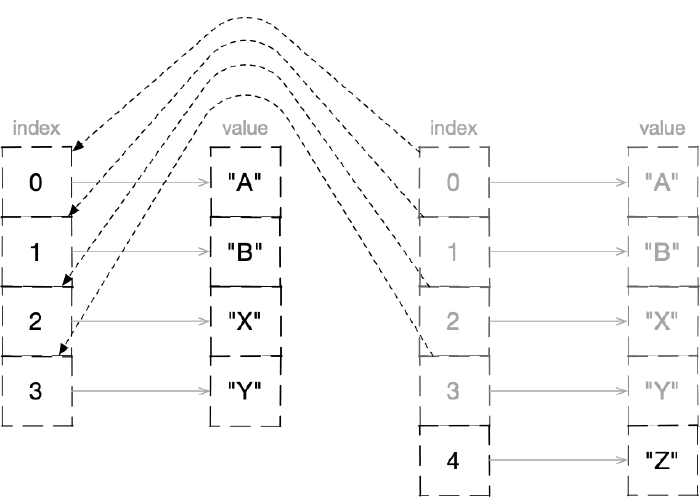
Persistent vectors, maps, and sets normally make this efficient through structural
sharing: a changed result reuses unaffected internal nodes from the previous value.
This is an implementation technique behind the contract, not a promise that every
operation allocates a distinct top-level object. A no-op may return the same object.
After adding an element to a vector, a new object is created that shares most of the structure with the previous one
The complex, built-in structures of Clojure rely on the mentioned sharing, which is
realized through the implementation of wide-branching trees equipped with indexes that
speed up searching.
Immutable Data
An immutable value cannot observably change after construction. This is a semantic
property, not a claim about a fixed memory location or an immutable variable: a name or
reference may later denote another value while the original value remains unchanged.
Although internally we deal with data sharing within persistent structures and certain
modifications of references to changed fragments, these processes are safely isolated and
hidden from the programmer in the language implementation.
From the program author’s perspective, an operation on a persistent structure yields a
value with new contents. For example, adding a previously absent element to a large set
produces a set value that includes it while the old set remains unchanged. Structural
sharing keeps this practical without making object identity part of the collection API.
Reference Types
Reference types complement immutable values by representing identities whose current
state may change over time. Each reference type defines a specific contract for
reading and changing that state: atomic compare-and-set, transactions, asynchronous
actions, root bindings, or dynamic thread bindings. They do not all provide the same
kind of isolation.
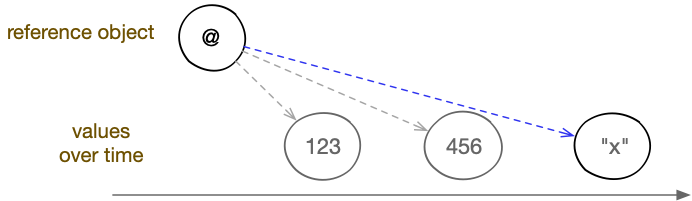
It is useful to model a reference as coordinating access to a current value. Whether an
implementation stores that value directly or through another pointer is not part of the
public contract. Updating the reference selects a new current value; it does not mutate
the persistent value that was current before the update.
Reference types allow pointing to values that change over time
In Clojure, thanks to reference types, we are able to control the rules for data
exchange between concurrently executed activities, as well as globally (throughout the
program) identify selected in-memory objects, e.g., functions visible within a
namespace or important application settings.
The choice of a specific reference type will depend on how we want to operate on data in
a multi-threaded context:
Var represents named global bindings and optional dynamic context. Its root
binding is shared by default; only a Var marked dynamic can acquire stack-disciplined
thread bindings. A Var used as a symbol form is automatically dereferenced.
Atom coordinates synchronous, independent state updates with atomic
compare-and-set semantics. An update function may be retried and must therefore be
free of non-idempotent side effects.
Agent applies actions asynchronously. Actions sent to one Agent are applied
serially in send order; updates across different Agents are not coordinated.
More complex operations requiring coordinated handling of multiple values will require
the Ref type, which uses Software Transactional Memory.
Several other Clojure values are also dereferenceable, although they do not all model
repeatedly changing shared identities:
Future – used for performing computations in a thread other than the
current one; the current thread is blocked only when the result is read (dereferenced);
Promise – a single-assignment delivery point whose value may be supplied
by any thread;
Delay – used for synchronously deferring evaluation, which will be carried
out upon the first read attempt;
Volatile – a lightweight mutable cell intended for controlled
single-threaded use; its compound updates are not atomic coordination operations.
It is worth noting that in Clojure we primarily deal with operating on bindings of
symbolic names or reference types to values, rather than on variables. Values are
immutable, and the way to create new ones is to perform operations on existing ones,
retrieve them from the environment, or place them literally in the program code.
If a result needs a local name, a lexical binding such as let associates a
symbol with that value for a limited scope. Such a binding is not a changing identity.
When the domain actually requires an identity with successive states, a suitable
reference object may coordinate changes to its current value.
In practice, we will very often encounter situations where both of the above-mentioned
approaches are used simultaneously. For example, to create a globally visible value with
a fixed name (the equivalent of a variable) in a program, we will use a symbolic
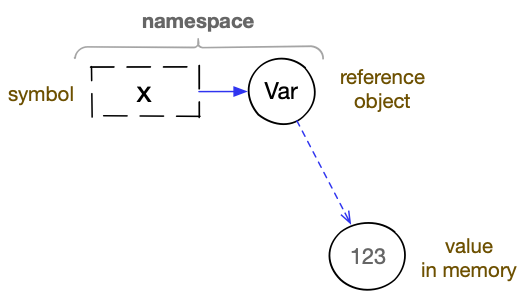
identifier. It will be bound in a namespace to a reference object of the
Var type, and only the reference contained within it will point to a specific
value.
A global variable in Clojure is based on binding a symbol to a reference object of type Var and binding that object to a current value
Two questions arise here. First: would not just the namespace and an association of a
symbol with a value in memory suffice? Yes, that would be possible, but then we would
introduce conventional global variables into the language – a construct that requires
“arming” with appropriate control and isolation mechanisms when the program is to run on
multiple threads. Additionally, the kinds of these mechanisms would have to be matched to
the types of specific variables. Without this, or in the case of incorrect implementation
of concurrency patterns by the programmer, problems that we face in the imperative
paradigm could arise: race conditions, deadlocks, etc.
The next issue is the seemingly somewhat complicated presentation of the entire
operation of naming global values. First, the symbolic identifier must be assigned to a
reference object in a namespace, and then the current value of the reference should be
set. Fortunately, we do not have to (although we can) manage this process in such detail,
because we have at our disposal appropriate macros and special forms, e.g., def
and defn.
(def x 1)
; => #'user/x

(defn function [] 1)
; => #'user/function
Lexical constructs such as let associate identifiers directly with values inside a
limited scope. Initializers are evaluated from left to right, and a later binding may
shadow an earlier binding with the same name in the remainder of the form. No binding
is overwritten, and this mechanism is distinct from the per-thread dynamic-binding
stack maintained for Vars.
Shadowing a lexical binding
(let [x1; x bound to 1x(inc x); x bound to 2, because (inc x)x(inc x)]x); x bound to 3, because (inc x); => 3
(let [x 1            ; x bound to 1
      x (inc x)      ; x bound to 2, because (inc x)
      x (inc x)] x)  ; x bound to 3, because (inc x)
; => 3
Identifiers are data types that serve to name values, collection elements, or reference
objects. In Clojure, symbols or keywords are used as identifiers. The
former, when expressed literally, have special syntactic significance, meaning that a
process of name resolution is performed on them. Keywords are not automatically
transformed into the objects they identify, and they are used for creating enumeration
types and indexing the contents of associative structures.
Symbols
A symbol is a data type used for names in Clojure forms and as symbolic
application data. Compiler analysis interprets symbols according to context: as lexical
names, Var names, class names, special-form names, or binding forms.
Symbol syntax admits letters, digits, and several punctuation characters, with special
rules for initial digits, /, ., :, and the reserved symbol &. For unusual names,
the official reader reference is more reliable than a short whitelist.
If a slash character (/) appears in the name of a literally expressed symbol, it will
be treated as a separator between the part specifying the namespace and the part
constituting the proper name. A dot (.) has a similar meaning, but it serves to
separate Java class names or namespace parts originating from packages.
Symbol Forms
There are three basic forms based on symbols:
An unquoted symbol presented for evaluation is a symbol form. Compiler analysis
resolves it in the current context and evaluation produces the associated value.
Examples are:
name,
(name other-name).
A quoted symbol or one generated using the symbol function produces a Symbol
value for application use rather than resolving it. We then speak of a literal
symbol. For example:
'name,
'(name other-name),
(quote name),
(symbol "name").
In certain constructs (e.g., in the let special form, the def special form, the
defn macro, or a function’s parameter vector) unquoted symbols will create so-called
binding forms. Through them it is possible to produce
bindings with values, that is, to name objects placed in memory, e.g., results of
executed operations, received arguments, or values expressed literally. For example:
Symbols are not automatically interned, so equal symbols may be distinct objects.
Equality and hashing are nevertheless value-based, making symbols valid associative
keys. Keywords are often more idiomatic for application schemas because they evaluate
to themselves and conventionally denote keys, not because symbol keys are incorrect.
Example of two identically named symbols
1(identical? 'a'a); are these two symbols the same object?2; => false ; they are not34(= 'a'a); are these two symbols equal?5; => true ; yes, they are
(identical? 'a 'a)   ; are these two symbols the same object?
; => false           ; they are not

(= 'a 'a)            ; are these two symbols equal?
; => true            ; yes, they are
Symbol Structure
Internally, symbols are objects consisting of:
a text label (name), expressed as a character string with the previously mentioned
properties;
an optional character string denoting the namespace to which some objects
identified by symbols should be assigned (if they use namespaces).
The symbol itself is not placed in any map representing a namespace at
the moment of creation, but it can be marked in such a way that other language constructs
(e.g., objects of the Var type) can later make use of this information.
Symbols that contain namespace information are called namespace-qualified symbols;
sometimes the jargon term fully-qualified symbols is also used.
Examples of namespace-qualified symbols
'namespace/name'other/other-name
'namespace/name
'other/other-name
Symbols themselves do not store references to the values that are identified with
their help. Their usefulness in this regard lies in the fact that symbol forms are
treated as identifiers during expression evaluation. At that point, various areas
(depending on context) where symbol-to-value mappings may reside are searched. Symbols in
Clojure therefore cannot be called a reference type.
Using Symbols
The reader lets us express symbols directly, but it is compiler analysis – not the
reader – that resolves an unquoted symbol form. Quoting or the symbol function gives
us the Symbol value itself.
Symbol Forms
Symbol forms arise when unquoted symbol values are presented for evaluation in
positions where they are not binding forms.
Usage:
symbol,
namespace/symbol.
More precisely, symbol forms can be used to identify:
Java classes (for example, String or java.time.Instant),
The reader creates a clojure.lang.Symbol. During compiler analysis, an unqualified
symbol may denote a special form, a lexical binding, a Var or imported class mapped by
the current namespace, or a Java class name. A qualified symbol may denote a Var in a
namespace, a Var reached through an alias, or a static Java member, depending on its
shape and context. This is contextual resolution; there is no universal thread-local
“symbol stack” searched for every name.
If a symbol cannot be resolved, compilation fails with an Unable to resolve symbol
diagnostic. The public contract is the resolution failure, not one stable wrapper
exception class across every loading and evaluation context.
Literal Symbols
Symbols are not self-evaluating, but quote can return a symbol without resolving it,
and symbol can construct one at runtime. Such symbol values can represent arbitrary
application data: configuration labels, flow markers, classifications, and so on.
Usage:
'symbol,
(quote symbol),
(symbol symbol-name),
(symbol namespace-name symbol-name).
There are two ways to obtain literal symbol values: quoting and using the
functionsymbol.
Quoting uses the quote special form or an apostrophe, which the reader expands to a
quote form. The reader constructs the symbol normally; the compiler then applies
quote’s rule and returns that argument without resolving it.
The symbol function constructs symbols from given names. It accepts one
mandatory argument, which should be a symbol name expressed as a character
string. Optionally, we can also pass it as the first argument a namespace
name expressed in the same way, if we want to create a namespace-qualified symbol. In the
two-argument version, the symbol name must then be given as the second argument. The
return value is a symbol object, which we can use in the program just like any other
value.
Both the symbol function and the quote special form can yield a symbol value. In a
quoted form the reader has already constructed the symbol as part of source data;
symbol constructs one when that function call executes.
Examples of creating literal symbols
1(symbol "abc"); creating the symbol abc2(symbol "user""abc"); creating the symbol abc with namespace user3(quote abc); quoting creates symbols for corresponding names4'abc; syntactic sugar for quote
(symbol        "abc")  ; creating the symbol abc
(symbol "user" "abc")  ; creating the symbol abc with namespace user
(quote           abc)  ; quoting creates symbols for corresponding names
'abc                   ; syntactic sugar for quote
Let us remember that qualifying a namespace does not place the symbol in any namespace,
but simply writes the appropriate information into it, which mechanisms making use of
namespaces can later employ.
Using quoted symbols does not differ from using other values:
Examples of using literal symbols
1(list 'bread'milk'cheese); list of symbols2(quote (breadmilkcheese)); quoted list of symbols3'(breadmilkcheese); quoted list of symbols
(list 'bread 'milk 'cheese)  ; list of symbols
(quote (bread milk cheese))  ; quoted list of symbols
'(bread milk cheese)         ; quoted list of symbols
Binding Forms of Symbols
Unquoted symbols also find application in expressing binding forms,
that is, during the creation of bindings (e.g., lexical bindings or function
parameters). We then speak of binding expressions, which include:
1;; global variable and function definitions: 2 3(def a5); global variable bound to a value 4(def a(fn [](+ 22))); global variable bound to a function 5(defn a[](+ 22)); global variable bound to a function 6 7;; parameter vectors: 8 9(fn [ab](list ab)); arguments of an anonymous function10(defn f[ab](list ab)); arguments of a named function1112;; binding vectors:1314(let [a5]a); lexical binding15(def ^:dynamic*a*1)16(binding [*a*5]*a*); dynamic binding17(with-local-vars [a5]@a); local variable
;; global variable and function definitions:

(def  a 5)                  ; global variable bound to a value
(def  a (fn [] (+ 2 2)))    ; global variable bound to a function
(defn a     [] (+ 2 2))     ; global variable bound to a function

;; parameter vectors:

(fn     [a b] (list a b))   ; arguments of an anonymous function
(defn f [a b] (list a b))   ; arguments of a named function

;; binding vectors:

(let             [a 5]  a)  ; lexical binding
(def ^:dynamic *a* 1)
(binding       [*a* 5] *a*) ; dynamic binding
(with-local-vars [a 5] @a)  ; local variable
Creating Unique Symbols, gensym
Sometimes a macro expansion needs a fresh symbol that will not collide with ordinary
names generated in the same runtime. The function gensym serves this purpose.
Usage:
(gensym prefix?).
The gensym function accepts one optional argument, which should be a character string,
and returns a symbol. If no string is provided, a symbol with a unique name prefixed with
G__ is generated. If an argument is provided, it is used as the name prefix.
Examples of using the gensym function
1;; completely unique name23(gensym)4; => G__286256;; unique name with a given prefix78(gensym "siefca")9; => siefca2865
;; completely unique name

(gensym)
; => G__2862

;; unique name with a given prefix

(gensym "siefca")
; => siefca2865
Type Testing, symbol?
We can check whether a given value is a symbol using the symbol? predicate.
Usage:
(symbol? value).
The function accepts one argument and returns true (if the given value is a
symbol) or false (if the given value is not a symbol).
Example of using the symbol? function
1(symbol? 'test); is test a symbol?2; => true ; yes, it is34(def test 42)5(symbol? test); is the value identified by the symbol test a symbol?6; => false ; no, it is not
(symbol? 'test) ; is test a symbol?
; => true       ; yes, it is

(def test 42)
(symbol? test)  ; is the value identified by the symbol test a symbol?
; => false      ; no, it is not
Qualification Testing
We can check whether a symbol contains a namespace using the predicates:
(simple-symbol? value) – is it a symbol without a namespace,
(qualified-symbol? value) – does it contain a namespace.
Examples of using the simple-symbol? and qualified-symbol? predicates
1(simple-symbol?'test); is test a simple symbol?2; => true ; yes, it is34(qualified-symbol?'x/test); does x/test have a namespace?5; => true ; yes, it does
(simple-symbol? 'test)       ; is test a simple symbol?
; => true                    ; yes, it is

(qualified-symbol? 'x/test)  ; does x/test have a namespace?
; => true                    ; yes, it does
Symbols as Functions
Symbols can be used as functions. They then serve as collection lookup forms. Lookup
functions based on symbols accept one mandatory argument, which should be a map
or a set.
Usage:
(symbol collection default-value?).
In the given structure, a search will be performed for the element whose key is the given
symbol, and if it is not found, the value nil or the value given as the second,
optional argument will be returned.
When an element is found in a map, the symbol function returns the value associated with
that symbol; when an element is found in a set, its value is returned.
Symbols (as well as collections) can optionally be equipped with metadata. These
are pieces of information that enable making certain annotations, that is, associating
additional, auxiliary values with objects, which can then be used to control program
behavior.
Some metadata entries are recognized and used by the language’s built-in
mechanisms. An example would be global variables, whose properties can be controlled
using metadata associated with the symbols used to name them. Objects of the Var type
can be equipped with the following metadata:
documentation strings added to functions (key :doc);
information about the file from which the function originates (key :file).
Metadata with self-named keys that do not collide with built-in ones can be used by the
programmer for their own purposes.
Metadata is stored in maps and represented as key–value pairs. Keys can be
arbitrary objects, but by convention keywords are most commonly used.
Metadata is not a constituent of the values of the objects to which it is
attached. Comparing two objects that are identical in terms of values but have different
metadata will yield logical true.
When creating global variables that are identified by symbols, the
metadata placed in those symbols is copied to Var objects.
Reading Metadata, meta
To retrieve metadata from a value that supports it, use the meta function.
Usage:
(meta value).
The meta function returns the value’s metadata map, or nil when the value has none
or does not support metadata.
Examples of using the meta function
1;; creating a global variable (a reference to the value 5) 2 3(def x5) 4 5;; no metadata for the value 5 (pointed to by the symbol) 6 7(meta x) 8; => nil 910;; no metadata for the symbol x1112(meta 'x)13; => nil1415;; there is metadata for the global variable1617(meta #'x)18; => { :ns #<Namespace user>,19; => :name x, :file "NO_SOURCE_PATH",20; => :column 1,21; => :line 1 }2223;; metadata expression, metadata present2425(meta '^:testingy)26; => {:testing true}
;; creating a global variable (a reference to the value 5)

(def x 5)

;; no metadata for the value 5 (pointed to by the symbol)

(meta x)
; => nil

;; no metadata for the symbol x

(meta 'x)
; => nil

;; there is metadata for the global variable

(meta #'x)
; => { :ns #<Namespace user>,
; =>   :name x, :file "NO_SOURCE_PATH",
; =>   :column 1,
; =>   :line 1 }

;; metadata expression, metadata present

(meta '^:testing y)
; => {:testing true}
Adding Metadata, with-meta
To replace the metadata of a value that implements IObj, use the with-meta
function.
Usage:
(with-meta value metadata).
The first argument is a metadata-capable value and the second is the new metadata
map. The function returns a value with the same logical contents and the
provided metadata; it does not mutate the input.
Example of using the with-meta function
(with-meta 'name{:key"value"}); => name
(with-meta 'name {:key "value"})
; => name
It is worth keeping in mind that metadata set in this way will be present only in the
symbol returned by this specific expression and will not be attached to the symbol we are
operating on, because like other values, it is immutable.
An important characteristic of handling symbols equipped with metadata is that some
objects identified by them copy the metadata when creating a binding. An example of
this behavior are the mentioned global variables.
To avoid confusion, one should remember the distinction between the metadata of symbols
identifying objects, the metadata of those objects, and even the metadata of objects
pointed to by objects (in the case of reference types, which will be discussed in more
detail in later chapters).
It is entirely possible and common that a symbol is not equipped with metadata, but the
object identified by it does have metadata assigned.
Metadata Expressions
Clojure also provides the ^ reader macro for attaching metadata to the next
metadata-capable form. Its result is equivalent in spirit to using with-meta, while
the exact merge and placement rules belong to the reader.
Usage:
^:flag value,
'^:flag value,
^{ :key value ... } value,
'^{ :key value ... } value.
Using it involves the circumflex character, after which key–value pairs specifying
metadata follow in curly braces. If the metadata entry expresses the boolean value
true (i.e., it is a flag), the braces and value can be omitted, but one must
remember the colon before the key name.
Optionally, instead of a single key, a character string can be provided – in that case,
the key :tag will be set with the value of that string. In the case of metadata grouped
in curly braces, keys can be character strings, symbols, or keywords.
Examples of using the reader macro for setting metadata
1;; creating a global variable (a reference to the value 5) 2;; with a metadata flag set in the symbol 3 4(def ^:testingx5) 5; => #'user/x 6 7(meta #'x) 8; => { :ns #<Namespace user>, 9; => :name x, :file "NO_SOURCE_PATH",10; => :column 1,11; => :line 1,12; => :testing true}1314(def ^{:testing"label", :second123}x5)15; => #'user/x1617(meta #'x)18; => { :ns #<Namespace user>,19; => :name x, :file "NO_SOURCE_PATH",20; => :column 1,21; => :line 1,22; => :testing "label",23; => :second 123 }
;; creating a global variable (a reference to the value 5)
;; with a metadata flag set in the symbol

(def ^:testing x 5)
; => #'user/x

(meta #'x)
; => { :ns #<Namespace user>,
; =>   :name x, :file "NO_SOURCE_PATH",
; =>   :column 1,
; =>   :line 1,
; =>   :testing true}

(def ^{ :testing "label", :second 123 } x 5)
; => #'user/x

(meta #'x)
; => { :ns #<Namespace user>,
; =>   :name x, :file "NO_SOURCE_PATH",
; =>   :column 1,
; =>   :line 1,
; =>   :testing "label",
; =>   :second 123 }
Note: In the case of quoted symbols, the reader macro
should be placed after the quoting marker and before the symbol name for the metadata
setting to take effect.
Keywords are a data type in Clojure that resembles symbols and is conventionally
used for names in application data. The reader recognizes keyword syntax and returns a
clojure.lang.Keyword; evaluation of that keyword returns the keyword itself. In
operator position it is then callable because keywords implement IFn for associative
lookup.
Keywords are often used to label options or flags and as keys in associative data
structures. Two keywords with the same namespace and name are equal.
Keyword interning
JVM Clojure interns keywords, so equal keywords created within the same runtime are
normally represented by the same object.
Example demonstrating keyword interning
1(identical? :a:a); are these two keywords the same object?2; => true ; yes, they are34(= :a:a); are these two keywords equal?5; => true ; yes, they are
(identical? :a :a)      ; are these two keywords the same object?
; => true               ; yes, they are

(= :a :a)               ; are these two keywords equal?
; => true               ; yes, they are
Interning is useful implementation behavior, but = is the semantic comparison and
already has an optimized keyword path. Prefer it in application and library code;
manual (or (identical? a b) (= a b)) merely duplicates work that belongs inside the
equality implementation and makes portability harder.
Keyword namespaces
Keywords can optionally contain information about assignment to a specific
namespace. We can then speak of namespace-qualified keywords.
Namespace qualification prevents accidental collisions between keys or tags owned by
different libraries and communicates their domain. It does not make a keyword private,
and the namespace named by a single-colon keyword need not exist.
In literal notation, keywords may contain a slash character, which serves to
separate the namespace part from the actual keyword name.
Using keywords
Creating keywords, keyword
Keywords can be created using the keyword function.
Usage:
(keyword namespace? key).
In the single-argument variant, the function accepts a string or symbol and converts it
to a keyword (or returns a keyword unchanged). In the two-argument variant, the
namespace name and keyword name are supplied separately as strings.
The function returns a keyword object that is interned (if it did not exist, it is
created; if it already existed, its instance is returned).
Keywords can be created using a keyword literal in the form of notation with a
leading colon.
Usage:
:key,
:namespace/key,
::key,
::namespace/key.
Before the actual keyword name, we can place a namespace name separated by a
slash character. When the literal begins with a single colon, the specified
namespace does not need to be defined; we can therefore provide any string of
characters.
Two colons with a name containing a slash character will mean that we wish
the created keyword to undergo the process of resolving the namespace specified by
an alias in the current namespace. The created keyword will have its
qualified namespace set to the target namespace pointed to by the alias.
A special case is a keyword literal preceded by two colons without specifying a
namespace. The namespace will be set according to the value indicated by the
special dynamic variable *ns*, which denotes the current namespace.
Examples of keyword expressions
1:key; => :key 2:namespace/key; => :namespace/key 3 4(ns user); current namespace: user 5::key; => :user/key 6 7(ns demo); current namespace: demo 8::key; => :demo/key 910;; importing bindings from the clojure.string namespace11;; into the current namespace using alias s1213(require'[clojure.string:ass])1415(read-string"::s/key"); => :clojure.string/key
:key            ; => :key
:namespace/key  ; => :namespace/key

(ns user)       ; current namespace: user
::key           ; => :user/key

(ns demo)       ; current namespace: demo
::key           ; => :demo/key

;; importing bindings from the clojure.string namespace
;; into the current namespace using alias s

(require '[clojure.string :as s])

(read-string "::s/key") ; => :clojure.string/key
Type checking, keyword?
Checking whether an object is a keyword is possible using the keyword?
predicate.
Usage:
(keyword? value).
If the given value is a keyword, true will be returned; otherwise false.
We can check whether a keyword contains a namespace using the predicates:
(simple-keyword? value) – whether it is a keyword without a namespace,
(qualified-keyword? value) – whether it contains a namespace.
Examples of using the simple-keyword? and qualified-keyword? predicates
1(simple-keyword?:test); is test a simple keyword?2; => true ; yes, it is34(qualified-keyword?:x/test); does x/test have a namespace?5; => true ; yes, it does
(simple-keyword? :test)        ; is test a simple keyword?
; => true                      ; yes, it is

(qualified-keyword? :x/test)   ; does x/test have a namespace?
; => true                      ; yes, it does
Searching for keywords, find-keyword
We can check whether a given keyword has been interned using the find-keyword
function.
Usage:
(find-keyword key).
The function allows us to look up a keyword that was previously created, e.g., by
referencing it.
Example of using the find-keyword function
1(find-keyword"word"); does it exist?2; => nil ; no34:word; first use interns the keyword5(find-keyword"word"); does it exist?6; => :word ; yes
(find-keyword "word")  ; does it exist?
; => nil                ; no

:word                  ; first use interns the keyword
(find-keyword "word")  ; does it exist?
; => :word             ; yes
It is also possible to search for keywords with qualified namespaces:
Examples of using find-keyword with namespaces
1(find-keyword"namespace""word"); does it exist?2; => nil ; no34:namespace/word; first use interns the keyword5(find-keyword"namespace""word"); does it exist?6; => :namespace/word ; yes
(find-keyword "namespace" "word")  ; does it exist?
; => nil                             ; no

:namespace/word                    ; first use interns the keyword
(find-keyword "namespace" "word")  ; does it exist?
; => :namespace/word               ; yes
Keywords as functions
Keywords can be used as functions. They then accept one mandatory argument, which
should be a map or a set.
Usage:
(key collection default-value?).
A lookup will be performed in the given structure for an element whose key is the
specified keyword; if not found, nil will be returned or the value provided as
the second, optional argument.
When an element is found in a map, the keyword function returns the value
associated with that key; when an element is found in a set, it returns the
element’s value.
Since version 1.9, Clojure has been equipped with several functions that allow
checking the properties of identifiers (symbols and keywords).
Testing identifiers
We can check whether a given object is an identifier (a symbol or a keyword), as
well as what properties it has, using the following predicates:
(ident? value) – whether it is an identifier,
(simple-ident? value) – whether it is an identifier without a namespace,
(qualified-ident? value) – whether it is an identifier with a namespace.
Examples of using identifier predicates
1(ident?'test); is test an identifier? 2; => true ; yes, it is 3 4(simple-ident?'test); is test a simple identifier? 5; => true ; yes, it is 6 7(qualified-ident?'x/test); does x/test have a namespace? 8; => true ; yes, it does 910(ident?:test); is :test an identifier?11; => true ; yes, it is1213(simple-ident?:test); is :test a simple identifier?14; => true ; yes, it is1516(qualified-ident?:x/test); does :x/test have a namespace?17; => true ; yes, it does
(ident? 'test)              ; is test an identifier?
; => true                   ; yes, it is

(simple-ident? 'test)       ; is test a simple identifier?
; => true                   ; yes, it is

(qualified-ident? 'x/test)  ; does x/test have a namespace?
; => true                   ; yes, it does

(ident? :test)              ; is :test an identifier?
; => true                   ; yes, it is

(simple-ident? :test)       ; is :test a simple identifier?
; => true                   ; yes, it is

(qualified-ident? :x/test)  ; does :x/test have a namespace?
; => true                   ; yes, it does
Boolean values
Handling two-valued logic relies on the Boolean type (java.lang.Boolean),
whose objects can express the values true or false. These two symbols, in
symbolic forms, evaluate to objects of type Boolean, denoting logical true and
logical false, respectively.
Objects of type Boolean, despite expressing only two states, occupy at least 16
bytes in memory (due to the JVM object header). The primitive boolean type takes up
1 byte.
Using boolean values
Boolean values are, by convention, returned by functions whose names end
with a question mark. Such functions are called predicates.
In addition, there are functions specific to boolean values that allow creating,
casting, and checking them.
Conditional execution
In Clojure, special forms responsible for conditional execution of
computations (e.g., if) treat logical false (expressed by the atom
false) and the null value (expressed by the atom nil) identically. They
internally perform type casting of data of various types to boolean values
(similarly to the boolean function described below).
Examples of type casting in conditional constructs
Boolean values can be created not only by placing literally expressed values
true or false, but also by using the boolean function.
Usage:
(boolean value).
The function accepts a value of any type and performs casting to true or
false. The rule is that the returned value is true, unless nil or false
was provided as the argument.
The and macro is used for controlling program execution, allowing the expression
of logical conjunction.
Usage:
(and & expression...).
The macro evaluates the values of successive expressions given as its arguments
(in order of occurrence) as long as their value is logical true (not false
and not nil).
The returned value is the value of the last provided expression, or false or
nil if any of the expressions returned such a value and processing was
interrupted. When no arguments are provided, true is returned.
The or macro is used for controlling program execution, allowing the expression
of logical disjunction.
Usage:
(or & expression...).
The macro evaluates the values of successive expressions given as its arguments
(in order of occurrence) until the value of one of them is logical true (not
false and not nil).
The returned value is the value of the last processed expression. When no
arguments are provided, the or macro returns nil.
In Clojure, there are built-in higher-order functions that help operate on
boolean values returned by other functions or use predicates provided as logical
operators. They will be discussed in more detail in later chapters.
Numeric values can be expressed in Clojure in many ways, for example by using
numeric literals, which the reader turns into self-evaluating numeric values.
Numeric data types
Numbers in Clojure are handled by all numeric data types present in Java, plus
two additional types specific to this language. Some types can be expressed using
numeric literals, while others require providing an appropriate function that
returns an instance of the class responsible for handling them.
Byte:
class: java.lang.Byte,
range: from -128 to 127,
creation: (byte value);
Short:
class: java.lang.Short,
range: from -32,768 to 32,767,
creation: (short value);
Integer:
class: java.lang.Integer,
range: from -2,147,483,648 to 2,147,483,647,
creation: (int value);
Ratio:
class: clojure.lang.Ratio,
range depends on available memory,
creation: (rationalize value.decimal-value) or (/ dividend divisor),
literal: 1/2;
Long:
class: java.lang.Long,
range: from -263 to 263-1,
creation: (long value),
literals:
8 – decimal notation,
0xfe – hexadecimal notation,
012 – octal notation,
2r1101001 – binary notation,
36rABCDY – base-36 notation;
BigInt:
class: clojure.lang.BigInt,
range depends on available memory,
creation: (bigint value),
literal: 123123123123123123N;
BigInteger:
class: java.math.BigInteger,
range depends on available memory,
creation: (biginteger value);
BigDecimal:
class: java.math.BigDecimal,
range depends on available memory,
creation: (bigdec value),
literal: 10000000000000000000M;
Float:
class: java.lang.Float,
representation: IEEE 754 binary32, including signed zero, infinities, and NaN,
creation: (float value);
Double:
class: java.lang.Double,
representation: IEEE 754 binary64, including signed zero, infinities, and NaN,
creation: (double value),
literals:
2.0
-1.2e-5.
Arithmetic operators
Arithmetic operators are functions that allow performing basic mathematical
operations on numeric types.
Usage:
variadic operators:
(+ & addend...) – sum,
(- minuend & subtrahend...) – difference,
(* & factor...) – product,
(/ dividend & divisor...) – quotient,
(min value & value...) – minimum,
(max value & value...) – maximum;
two-argument operators:
(quot dividend divisor) – quotient of integer division,
(rem dividend divisor) – remainder of division (may be negative),
(mod dividend divisor) – modulus (Gaussian method, sign of result depends on sign of divisor);
single-argument operators:
(inc value) – increment by one,
(dec value) – decrement by one.
Operators for large numbers
Some operations may lead to an integer overflow error. This results from
using integers, i.e., objects of type java.lang.Long, in arithmetic operations.
An overflow occurs when a given operation (e.g., addition or multiplication) would
produce a value greater than what this data type supports. To handle such cases,
Clojure provides additional operators that, when necessary, perform appropriate
casting to values expressed by types with wider ranges. These functions differ
from their regular counterparts by their symbolic names – they have an appended
apostrophe character at the end.
Usage:
variadic operators:
(+' & addend...) – sum,
(*' & factor...) – product;
single-argument operators:
(inc' value) – increment by one,
(dec' value) – decrement by one.
Unchecked overflow operators
At runtime, the Clojure language checks whether certain operations will
cause overflows or underflows. However, there are operator variants
intended for the Integer type that skip these checks.
The dynamic special variable*unchecked-math* instructs the
compiler to emit unchecked primitive arithmetic in supported contexts. It does not
disable every numeric check for every boxed or arbitrary-precision type.
Comparison operators
Usage:
(= value & value...) – equal,
(== value & value...) – numerically equal,
(not= value & value...) – not equal,
(< value & value...) – less than,
(> value & value...) – greater than,
(<= value & value...) – less than or equal,
(>= value & value...) – greater than or equal,
(compare value value ) – compares values or collection elements.
Casting to numeric types is possible using the functions listed
earlier, which also serve to create numeric values.
Usage:
(byte value),
(short value),
(int value),
(long value),
(float value),
(double value),
(bigdec value),
(bigint value),
(num value),
(rationalize value),
(biginteger value).
Numeric type predicates
Using predicates, one can test various properties of numeric values.
Usage:
(zero? value) – whether the value is zero,
(pos? value) – whether the value is positive,
(neg? value) – whether the value is negative,
(pos-int? value) – whether the integer value is positive,
(neg-int? value) – whether the integer value is negative,
(nat-int? value) – whether the integer value is a natural number (incl. 0),
(even? value) – whether the value is even,
(odd? value) – whether the value is odd,
(number? value) – whether the value is a numeric type,
(ratio? value) – whether the value is a ratio (type Ratio),
(rational? value) – whether the value is a rational number,
(integer? value) – whether the value is an integer (excluding BigDecimal),
(decimal? value) – whether the value is of type BigDecimal,
(float? value) – whether the value is a floating-point number,
(double? value) – whether the value is a double-precision number,
Bitwise operators
Bitwise operations can be performed on numeric type data.
Usage:
variadic functions (min. 2 arguments):
(bit-and value value-2 & value...) – bitwise AND,
(bit-and-not value value-2 & value...) – AND with NOT,
(bit-or value value-2 & value...) – bitwise OR,
(bit-xor value value-2 & value...) – bitwise XOR;
two-argument functions:
(bit-test value index) – read the state of the bit at a given position,
(bit-flip value index) – toggle the bit at a given position,
(bit-set value index) – set the bit at a given position,
(bit-clear value index) – clear the bit at a given position,
(bit-shift-left value n) – left bit shift,
(bit-shift-right value n) – right bit shift,
(unsigned-bit-shift-right value n) – unsigned right bit shift;
single-argument functions:
(bit-not value) – bitwise NOT.
Pseudorandom numbers
Pseudorandom numbers are generated algorithmically and approximate a requested random
distribution. The standard rand and rand-int operations are not cryptographic
random-number APIs and should not be used for secrets, tokens, or keys.
Generating pseudorandom numbers, rand
The rand function is used to generate pseudorandom numbers.
Usage:
(rand upper-bound?).
The function accepts one optional argument indicating the upper bound of the range
from which the result should be drawn (defaults to 1 if no argument is provided).
This range is right-open (it does not include the value specified as the right
bound), and its first element is 0.
The value returned by the function is a floating-point number.
Integer pseudorandom numbers, rand-int
The rand-int function works similarly to rand, i.e., it generates a
pseudorandom number, but returns an integer.
Usage:
(rand-int upper-bound).
The function accepts one positive upper bound. Under that contract, the result belongs
to the right-open range from 0 inclusive to the bound exclusive.
Some functions and mechanisms used for handling numeric data types can be
configured. This is done using appropriate functions and special variables.
Overflow checks
By default, supported primitive integer arithmetic emits checked operations that
throw when a result exceeds the represented range. Bind *unchecked-math* while code
is compiled to request wrapping primitive operations in supported expressions. This
is a code-generation setting, not a runtime switch for functions compiled earlier.
Example of setting *unchecked-math* for subsequent compilation
(set!*unchecked-math*true);; compile definitions that intentionally use wrapping primitive arithmetic(set!*unchecked-math*false)
(set! *unchecked-math* true)
;; compile definitions that intentionally use wrapping primitive arithmetic
(set! *unchecked-math* false)
Note: Type hints can help the compiler select a primitive path, but they neither
validate values nor universally remove overflow checks. Use explicit unchecked
operators when wrapping behavior is part of the contract.
Setting precision, with-precision
For BigDecimal type data, we can control the precision and rounding mode of
results. The with-precision macro is used for this purpose.
Usage:
(with-precision precision value),
(with-precision precision :rounding mode value).
Its first argument sets the number of significant digits (precision), the optional second argument
sets the rounding mode, and the last argument is the expression to be computed
using these settings.
Individual Clojure character values are represented by java.lang.Character. Each is
one 16-bit UTF-16 code unit, not necessarily one complete Unicode code point or one
user-perceived grapheme. Characters outside the Basic Multilingual Plane require a
surrogate pair and therefore cannot fit in one Clojure character value.
Creating characters
Characters can be created using appropriate functions or character literals.
Character literals
Using the symbolic notation with a backslash, we can literally express individual
characters.
Usage:
\character,
\special-character.
Examples of literal character creation
1\d; character literal2; => \d34\newline; character literal for a special character (newline)5; => \newline
\d               ; character literal
; => \d

\newline         ; character literal for a special character (newline)
; => \newline
Character from code, char
Using the char function, we can create a character from the numeric value of one
UTF-16 code unit.
Usage:
(char character-code).
The argument must fit in the range of Java char, from 0 to 65535. Endianness is not
part of this value-level contract; it matters only when UTF-16 is encoded as bytes.
Example of using the char function
1(char 100); creating a character with code 100 (letter d)2; => \d34(char 261); letter ą5; => \ą67(char 128512); U+1F600 GRINNING FACE needs a surrogate pair8; => IllegalArgumentException: Value out of range for char: 128512
(char 100)       ; creating a character with code 100 (letter d)
; => \d

(char 261)       ; letter ą
; => \ą

(char 128512)    ; U+1F600 GRINNING FACE needs a surrogate pair
; => IllegalArgumentException: Value out of range for char: 128512
Character from string, get
The get function allows us to retrieve any character from a given string.
Usage:
(get string position).
The first argument is a string, and the second is a zero-based UTF-16 code-unit index.
The function returns a character or the value nil if it was unable to retrieve the
character (e.g., due to an invalid position number).
Example of retrieving individual characters from strings
(get "siefca"2); => \e
(get "siefca" 2)
; => \e
Character sequences
Strings in Clojure can be treated as sequences of Character values and used with
functions designed for sequences. On JVM Clojure these elements are UTF-16 code
units. Sequence operations can therefore split supplementary code points and grapheme
clusters; use Java’s code-point APIs or a Unicode text-segmentation library when those
are the units required by the domain.
Below is a list of selected sequential operations that produce a character or a set
of characters from a string.
Usage:
(seq string) – creates a character sequence,
(first string) – retrieves the first character,
(last string) – retrieves the last character,
(rest string) – retrieves all characters except the first,
(nth string index) – retrieves the specified character,
(rand-nth string) – retrieves a random character,
(apply function string) – substitutes each character as a function argument,
(every? predicate string) – checks a condition for each character,
(reverse string) – reverses the order of the character sequence,
(frequencies string) – counts character occurrence frequencies,
(when-first [char string ...] expression) – evaluates for the 1st character.
Generating an escape sequence for characters with special meaning is possible
using the char-escape-string function.
Usage:
(char-escape-string character).
The first argument should be a special character (expressed literally or in another
way).
The function returns an escape sequence for the given special character, or nil if
no escape sequence exists.
Examples of using the char-escape-string function
1;; no escape sequence for the letter c 2 3(char-escape-string\c); => nil 4 5;; escape sequence for newline 6 7(char-escape-string\newline); => "\\n" 8 9;; escape sequence for backspace1011(char-escape-string\backspace); => "\\b"
;; no escape sequence for the letter c

(char-escape-string \c)          ; => nil

;; escape sequence for newline

(char-escape-string \newline)    ; => "\\n"

;; escape sequence for backspace

(char-escape-string \backspace)  ; => "\\b"
Names of special characters, char-name-string
Retrieving names for characters with special meaning is possible using the
char-name-string function.
Usage:
(char-name-string character).
The function takes one argument, which should be a special character (expressed
literally or in another way), and returns the name of that character, or nil if
no character was provided or the given character is not a special character.
Comparing whether a given character should come first, last, or be equal to
another character in terms of ordering (useful for sorting) is possible using
the compare function.
Usage:
(compare character-1 character-2).
The function takes two arguments and returns -1 (or a lesser value) when the first
argument should be placed before the second, 1 (or a greater value) in the opposite
case, and 0 if both values are equal. This is an ordering by UTF-16 code-unit value,
not locale-sensitive alphabetical collation.
Strings in Clojure are objects of the java.lang.String class. The language provides
appropriate functions to help handle them, and additionally, Java methods operating
on strings can be used.
Strings can also be treated as sequences of UTF-16 code units, allowing the use of
functions that operate on sequences. More about this access method can be found in the
section dedicated to character sequences. Java string indices and Clojure sequence
positions are therefore not automatically Unicode code-point or grapheme-cluster
indices.
Creating strings
There are several ways to create strings. You can use a text literal, use the str
function, or another function that returns a string based on input data.
Strings from text literals
Usage:
"This is a string",
"".
Example of using a text literal
1"This is a string"2; => "This is a string"34""5; => ""
"This is a string"
; => "This is a string"

""
; => ""
Strings from a series of values, str
The str function takes zero or more arguments. It attempts to convert
each value to a string, and then concatenates all obtained strings into one, which
is returned.
Usage:
(str & value...).
The function takes zero or more arguments of any values and returns a string that
is the concatenation of the given values converted to strings.
If no arguments are provided, str returns an empty string.
The format function takes at least one argument, which should be a format string
compliant with the syntax used by java.util.Formatter (corresponding to the syntax
used in the
sprintf function from the
C standard library).
Usage:
(format format-string & value...).
For each control sequence specified in the first argument (the format string) that
requires input data, a corresponding argument expressing the value to be substituted
must be provided.
The function returns a processed string constructed according to the given
formatting pattern.
Strings can be created from data originating from a captured output stream (usually
associated with the standard output descriptor). The with-out-str macro serves
this purpose.
Usage:
(with-out-str & expression...)
The macro takes zero or more expressions. If any of them
generates a side effect in the form of writing to the standard output stream, the
data will be captured and placed in the returned string.
Example of using the with-out-str macro
;; standard output of the expression into a string(with-out-str (println "Baobab")); => "Baobab\n"
;; standard output of the expression into a string

(with-out-str (println "Baobab"))
; => "Baobab\n"
Strings from values, pr-str
The pr-str function works similarly to str and serves to convert given values to
their symbolic representations (S-expressions). It works as if pr were used, but
the result is not displayed – instead, it is returned as a string.
(pr-str & value...)
The function takes zero or more values and renders them using pr semantics.
The returned value is the concatenation of textual representations of the values,
separated by single space characters.
Example of using the pr-str function
(pr-str [1234]'(1)); writes the representation of objects into a string; => "[1 2 3 4] (1)" ; as returned by the pr function
(pr-str [1 2 3 4] '(1))  ; writes the representation of objects into a string
; => "[1 2 3 4] (1)"    ; as returned by the pr function
Strings from values, prn-str
The prn-str function works similarly to str and serves to convert given values to
their symbolic representations (S-expressions). It works as if prn were used, but
the result is not displayed – instead, it is returned as a string.
(prn-str & value...)
The function takes zero or more values and renders them using prn semantics.
The returned value is the concatenation of textual representations of the values,
separated by single space characters. The string is terminated with a newline
character.
Example of using the prn-str function
(prn-str [1234]'(1)); writes the representation of objects into a string; => "[1 2 3 4] (1)\n" ; as returned by the prn function
(prn-str [1 2 3 4] '(1))  ; writes the representation of objects into a string
; => "[1 2 3 4] (1)\n"   ; as returned by the prn function
Strings from print result, print-str
The print-str function works like print, but instead of displaying the results,
it returns a string containing them.
(print-str & value...).
The function takes zero or more values and renders them using print semantics.
The returned value is the concatenation of textual representations of the values,
separated by single space characters.
Example of using the print-str function
(print-str "Ba"\o\b'ab); creates a string from the effect of calling print; => "Ba o b ab"
(print-str "Ba" \o \b 'ab)  ; creates a string from the effect of calling print
; => "Ba o b ab"
Strings from println result, println-str
The println-str function works like println, but instead of displaying the
results, it returns a string containing them.
(println-str & value...).
The function takes zero or more values and renders them using println semantics.
The returned value is the concatenation of textual representations of the values,
separated by single spaces and terminated by a newline.
Example of using the println-str function
(println-str "Ba"\o\b'ab); creates a string from the effect of calling println; => "Ba o b ab\n"
(println-str "Ba" \o \b 'ab)  ; creates a string from the effect of calling println
; => "Ba o b ab\n"
Comparing strings
Strings can be compared using generic operators.
Usage:
(= string & string...) – equal,
(compare string string ) – compares two strings lexicographically.
Retrieving the position of a given substring within a text is possible using the
clojure.string/index-of and clojure.string/last-index-of functions.
Usage:
(clojure.string/index-of string fragment start?)
– finds the position of the first occurrence,
(clojure.string/last-index-of string fragment start?)
– finds the position of the last occurrence.
The functions take two required arguments: a string and the sought text fragment.
The returned values are positions (counting from 0) at which the given substrings
can be found.
When the optional third argument start is provided, it should specify the position
from which the search will begin.
Examples of using the index-of and last-index-of functions
(clojure.string/index-of"Baobab was here.""b"); => 3(clojure.string/last-index-of"Baobab was here.""b"); => 5
(clojure.string/index-of      "Baobab was here." "b")  ; => 3
(clojure.string/last-index-of "Baobab was here." "b")  ; => 5
Counting characters
The count function
For a JVM string, count returns the number of UTF-16 code units, not necessarily the
number of Unicode code points or user-perceived characters.
For strings, counting is performed in constant time (O(1)), because the .length() method of the String class is used.
Usage:
(count string).
The first argument should be a string, and the returned value is its Java length.
(count "Baobab"); UTF-16 code units; => 6(count "A😀B"); the emoji occupies a surrogate pair; => 4
(count "Baobab")  ; UTF-16 code units
; => 6

(count "A😀B")    ; the emoji occupies a surrogate pair
; => 4
Regular expressions
Regular expressions (abbr. regexps) are objects that allow describing patterns
for matching against text. Internally, they are represented by appropriately optimized
data structures, but when creating them, a human-readable textual notation is used.
Regular expressions can be used to check whether given strings or their parts match
specific patterns. We can also build operators that, based on regular expressions, will
replace matching text fragments with others or extract those fragments.
Regular expression literals
In Clojure, regular expressions can be created using the appropriate literal notation:
#"pattern",
where pattern is a string specifying the content of the expression compliant with
the format of the argument accepted by the
java.util.regex.Pattern
class constructor.
Creating from pattern, re-pattern
Creating a regular expression object from a textual representation of a matching
pattern is possible using the re-pattern function. The generated value is the
compiled form of the given textual representation of the expression, and using such
an object has a positive impact on CPU resource utilization. The regular expression
object can be used multiple times by passing it as an argument to functions that
operate on regular expressions.
Usage:
(re-pattern pattern).
The function takes a string representing a matching pattern and returns a regular
expression object.
Example of using the re-pattern function
(re-pattern "\\d+"); creating a regular expression#"\d+"; syntactic sugar
It is worth noting the double backslash, which removes its special meaning.
Creating a matcher, re-matcher
Creating a matcher object lets us use functions that process strings with matching
patterns in the form of regular expressions. Thanks to it, the matching can be
reused in its already compiled, internal form. The matcher is a mutable Java object
that stores internal indices subject to change.
The re-matcher function is used to create a matcher object.
Usage:
(re-matcher expression string).
The function takes two arguments. The first should be a regular expression object,
and the second should be the examined string.
The returned value is a regular expression matcher object.
Calling the function from the example above will create an object of the
java.util.regex.Matcher class. The first argument passed to it is the regular
expression, and the second is the string to be matched against it. The created value
can then be passed as an argument to certain functions that extract matches,
e.g., re-find.
Warning: Internal structures of Matcher objects may change in an
uncoordinated manner, producing erroneous results.
Finding matches and groups, re-find
The re-find function finds matches of a given string against a regular expression
or matcher. It takes two arguments: a regular expression and a string. It can also
be used in a single-argument form – in that case, it takes a matcher object (of type
Matcher), and each invocation returns the next matching fragment.
Regular expressions can consist of groups, i.e., logical parts that contain
sub-patterns matching certain parts of the string. These groups can be nested. In the
case of a regular expression with groups, re-find will return a vector
whose individual elements correspond to successive matching groups. The exception is
the element at index zero, which contains the entire fragment of the string that
matches all patterns.
The re-find function internally makes use of the re-groups function described
below to return results.
Usage:
(re-find matcher),
(re-find expression string).
In the single-argument variant, the accepted argument is a regular expression matcher
object. In the two-argument variant, a regular expression object and the string to be
matched must be provided.
The returned value is the matched string fragment or a vector containing
the matches.
Example of using the re-find function
1;; returns the first match 2 3(re-find #"\d+""abc123def456") 4; => "123" 5 6;; returns matching groups 7 8(re-find #"(\d+)-(\d+)-(\d+)""000-111-222") 9; => ["000-111-222" "000" "111" "222"]1011;; naming a global matcher object1213(def matcher(re-matcher #"\d+""abc123def456"))14; => #'user/matcher1516;; repeating the matching three times1718(repeatedly319#(re-find matcher))20; => ("123" "456" nil)
;; returns the first match

(re-find #"\d+" "abc123def456")
; => "123"

;; returns matching groups

(re-find #"(\d+)-(\d+)-(\d+)" "000-111-222")
; => ["000-111-222" "000" "111" "222"]

;; naming a global matcher object

(def matcher (re-matcher #"\d+" "abc123def456"))
; => #'user/matcher

;; repeating the matching three times

(repeatedly 3
            #(re-find matcher))
; => ("123" "456" nil)
Warning: Using re-matcher is not thread-safe!
Reading matching groups, re-groups
The re-groups function allows reading the matching groups of a regular expression
that was most recently used.
Usage:
(re-groups matcher).
The function takes only one argument, which should be a matcher object, and returns
a vector of text fragments matching the groups.
If the last attempt to match a string against the expression resulted in nil, then
attempting to call re-groups will throw an exception.
Example of using the re-groups function
1;; global variable phone-matcher points to a matcher object 2 3(def phone-matcher(re-matcher #"(\d+)-(\d+)-(\d+)""000-111-222")) 4 5;; first perform matching 6 7(re-find phone-matcher) 8; => "000-111-222" 910;; reading matching groups as a vector1112(re-groups phone-matcher)13; => ["000-111-222" "000" "111" "222"]
;; global variable phone-matcher points to a matcher object

(def phone-matcher (re-matcher #"(\d+)-(\d+)-(\d+)" "000-111-222"))

;; first perform matching

(re-find phone-matcher)
; => "000-111-222"

;; reading matching groups as a vector

(re-groups phone-matcher)
; => ["000-111-222" "000" "111" "222"]
Warning: Using re-matcher is not thread-safe!
Matching, re-matches
The re-matches function tests whether a given string matches the pattern
represented by a regular expression.
The difference between re-find and re-matches is that the latter does not search
for partial matches. The given string must match the regular expression pattern in
its entirety.
Usage:
(re-matches expression string).
The function takes two arguments. The first should be a regular expression, and the
second a string.
The returned value will be a single string or a vector of strings if groups were used
(internally, the function uses re-groups). If there is no match, the value nil
is returned.
Thread-safe and consistent with the functional style is the use of
sequences (specifically lazy sequences) to represent matches of strings
against regular expression patterns. The re-seq function serves this purpose; it
internally uses the java.util.regex.Matcher.find() method and then uses re-groups
to generate the result.
Usage:
(re-seq expression string).
The function takes two arguments: a regular expression and a string, and returns a
lazy sequence of successive fragments matching the pattern.
Example of using the re-seq function
(re-seq #"[\p{L}\p{Digit}_]+""We will split this into words"); => ("We" "will" "split" "this" "into" "words")
(re-seq #"[\p{L}\p{Digit}_]+" "We will split this into words")
; => ("We" "will" "split" "this" "into" "words")
Quoting, re-quote-replacement
If the string used as a replacement in a clojure.string/replace call were generated
dynamically, it might be necessary to add escape sequences before patterns that
have special meaning. For example, we want to replace a certain word with an example
containing the notation $1, which when using regular expressions would be replaced
by the value of the first matching capturing group. In the case of a static string,
we would simply add a backslash (\$1) to remove the special meaning of the
notation. However, if the replacement were the result of program operation, we would
need to modify it by replacing special patterns with other ones. The
re-quote-replacement function can handle this for us.
Usage:
(re-quote-replacement string).
The first and only argument accepted by the function should be a string representing
the replacement that we want to use in other functions. The returned value is a
string in which patterns with special meaning in the context of regular expressions
have been quoted.
Example of using the clojure.string/re-quote-replacement function
1;; without removing special meaning 2 3(clojure.string/replace"Color red" 4#"(\w+) ([Rr]ed)" 5"$1 determined by the symbol $2") 6; => "Color determined by the symbol red" 7 8;; with removing special meaning 910(clojure.string/replace"Color red"11#"(\w+) ([Rr]ed)"12(str "$1 determined by the symbol"13(clojure.string/re-quote-replacement14" $1")))15; => "Color determined by the symbol $1"
;; without removing special meaning

(clojure.string/replace "Color red"
                        #"(\w+) ([Rr]ed)"
                        "$1 determined by the symbol $2")
; => "Color determined by the symbol red"

;; with removing special meaning

(clojure.string/replace "Color red"
                        #"(\w+) ([Rr]ed)"
                        (str "$1 determined by the symbol"
                             (clojure.string/re-quote-replacement
                              " $1")))
; => "Color determined by the symbol $1"
Transforming Strings
Capitalizing the first letter, capitalize
The function clojure.string/capitalize allows changing the first letter to
uppercase.
Usage:
(clojure.string/capitalize string).
The first and only argument should be a string, and the returned value is a string
whose first letter has been changed to uppercase and the remaining letters changed to
lowercase.
Example of using the clojure.string/capitalize function
(clojure.string/capitalize"john was here."); => "John was here."
(clojure.string/capitalize "john was here.")
; => "John was here."
Converting letters to lowercase, lower-case
Changing all letters to lowercase is possible using the function clojure.string/lower-case.
Usage:
(clojure.string/lower-case string).
The function takes one argument, which should be a string, and returns a new string
in which the appropriate characters have been transformed.
Example of using the clojure.string/lower-case function
The function clojure.string/escape adds escape sequences by replacing
specified characters with strings.
Usage:
(clojure.string/escape string map).
The first argument of the function should be a string, and the second a map
containing pairs where keys are characters and values are strings that should replace
them when found in the text.
Example of using the clojure.string/escape function
The function clojure.string/reverse reverses a string using Java’s
StringBuilder.reverse. Valid UTF-16 surrogate pairs are kept together, so a
supplementary code point is not split. Combining marks and multi-code-point grapheme
clusters may still be rearranged.
Usage:
(clojure.string/reverse string).
It takes a string as its first argument and returns a string that is the reversed
version of the given one.
Example of using the clojure.string/reverse function
The function reverse from the clojure.core namespace works differently than
clojure.string/reverse, because it returns a sequence of characters in
reversed order. Such a sequence can then be converted to a string, e.g., using
apply str. Since the sequence elements are UTF-16 code units, this route can reverse
the two halves of a surrogate pair and produce an ill-formed string. Prefer
clojure.string/reverse for ordinary JVM strings, and use grapheme-aware tooling when
the user-perceived character order matters.
Usage:
(reverse string).
The first argument should be a string, and the returned value is a
sequence of characters whose order has been reversed relative to the
order of the given string.
Removing whitespace characters (including newline characters) from both ends of a
string can be done using the function clojure.string/trim.
Usage:
(clojure.string/trim string).
The function takes a string as its first argument and returns its version with
whitespace characters and newline characters removed from its beginning and end.
Example of using the clojure.string/trim function
(clojure.string/trim" Baobab was here. "); => "Baobab was here."
(clojure.string/trim " Baobab was here.     ")
; => "Baobab was here."
Trimming from the left, triml
Removing whitespace characters (including newline characters) from the left side
of a string is possible thanks to the function clojure.string/triml.
Usage:
(clojure.string/triml string).
The function takes a string as its first argument and returns its version with
whitespace characters and newline characters removed from its beginning.
Example of using the clojure.string/triml function
(clojure.string/triml" John was here. "); => "John was here. "
(clojure.string/triml " John was here.     ")
; => "John was here.    "
Trimming from the right, trimr
The function clojure.string/trimr removes whitespace characters (including
newline characters) from the right side of a string.
Usage:
(clojure.string/trimr string).
The function takes a string as its first argument and returns its version with
whitespace characters and newline characters removed from its end.
Example of using the clojure.string/trimr function
(clojure.string/trimr" John was here. "); => " John was here."
(clojure.string/trimr " John was here.     ")
; => " John was here."
Trimming newlines, trim-newline
Removing newline characters from the right side of a string is possible using the
function clojure.string/trim-newline.
Usage:
(clojure.string/trim-newline string).
The function takes a string as its first argument and returns its version with
newline characters removed (from its end).
Example of using the clojure.string/trim-newline function
(clojure.string/trim-newline"John was here.\n"); => "John was here."
(clojure.string/trim-newline "John was here.\n")
; => "John was here."
Replacing text fragments, replace
Replacing fragments of a string with others is performed by the function replace,
whose first argument should be a string, the second a match pattern (in the form of a
regular expression, text, or character), and the third a replacement placed in
locations matching the pattern (text, character, or transformation function). The
returned value is a string in which fragments (or the entirety) matching the pattern
have been replaced by the appropriate components of the replacement (or the entire
replacement value).
The following combinations of patterns and replacements are possible:
string and string,
single character and single character,
regular expression and string,
regular expression and transformation function.
In the case of strings and single characters, the replacement text is not treated
specially, meaning no interpolated patterns can be used in it. The situation is
different when we provide a regular expression as the pattern – then we can specify
appropriate markers that will be replaced with values captured during the analysis of
those expressions.
If the replacement is a function, it receives each match and returns the replacement
text for that match. A regular expression without capturing groups supplies the
matched string; one with groups supplies a vector whose first element is the complete
match and whose remaining elements are captured groups. The function’s result is
converted to replacement text for the current occurrence.
Examples of using the clojure.string/replace function
1;; pattern as text, replacement as text 2 3(clojure.string/replace"Color red""red""blue") 4; => "Color blue" 5 6;; pattern as text, replacement as text 7 8(clojure.string/replace"Letter A"\A\B) 9; => "Letter B"1011;; pattern as regular expression, replacement as text1213(clojure.string/replace"Color red"#"\b(\w+ )(\w+)""$1blue")14; => "Color blue"1516;; pattern as regular expression, replacement as function1718(clojure.string/replace"Color red"19#"\b(\w+ )(\w+)"20#(str (%11)"blue"))21; => "Color blue"
;; pattern as text, replacement as text

(clojure.string/replace "Color red" "red" "blue")
; => "Color blue"

;; pattern as text, replacement as text

(clojure.string/replace "Letter A" \A \B)
; => "Letter B"

;; pattern as regular expression, replacement as text

(clojure.string/replace "Color red" #"\b(\w+ )(\w+)" "$1blue")
; => "Color blue"

;; pattern as regular expression, replacement as function

(clojure.string/replace "Color red"
                        #"\b(\w+ )(\w+)"
                        #(str (%1 1) "blue"))
; => "Color blue"
Note that in the last example we use an anonymous function
literal, in which we use the str function to concatenate two
strings: the first being the result of using a lookup form on the vector passed as
the first and only argument, and the second being a constant string. The S-expression
(%1 1) is therefore a call to the vector used as a function
placed in the first position with argument 1, which means the second element to
retrieve. In our case it is the string Color placed in the vector at that
position. As a reminder: the previous position, at index 0, contains the entire
matched string without division into groups.
Replacing the first occurrence, replace-first
The function clojure.string/replace-first is a variant of the above-described
function clojure.string/replace, which operates only on the first encountered
occurrence of the given pattern.
The first argument should be a string, the second a match pattern (in the form of a
regular expression, text, or character), and the third a replacement placed in
locations matching the pattern (text, character, or transformation function). The
returned value is a string in which fragments (or the entirety) matching the pattern
have been replaced by the appropriate components of the replacement (or the entire
replacement value).
The following combinations of patterns and replacements are possible:
string and string,
single character and single character,
regular expression and string,
regular expression and transformation function.
Example of using the replace-first function
(clojure.string/replace-first"will switch places one two three"#"(\w+)(\s+)(\w+)""$3$2$1")
(clojure.string/replace-first "will switch places one two three"
                              #"(\w+)(\s+)(\w+)" "$3$2$1")
Note that the last three words from the given string were not replaced.
Joining and Splitting Strings
Extracting substrings, subs
Extracting a substring with a specified start position and (optionally) end
position is possible using the function subs.
Usage:
(subs string start end?)
The function takes a string as its first argument and a zero-based start index. An
optional third argument specifies the exclusive end index. Both indices count UTF-16
code units, so careless boundaries may split a surrogate pair or a grapheme cluster.
The function returns a string, and in case of exceeding the bounds or providing
invalid position ranges, an exception is generated.
By using the str function and treating strings as character sequences,
we can also perform concatenation with a specified separator (text or a single
character):
Example of a sequential approach to joining strings with a separator
Joining strings into a single string with an optional separator in the form of a
string can also be achieved using the function clojure.string/join.
Usage:
(clojure.string/join sequence),
(clojure.string/join separator sequence).
To concatenate strings, they should be placed in a collection with a
sequential access interface or simply expressed sequentially.
In the single-argument variant, a sequence of strings should be passed. In the
two-argument variant, the sequence is passed as the second argument, and as the first
the separator, which is the element that will be used to join the elements (it can
be, for example, a space expressed as a string or a single character).
Examples of using the clojure.string/join function
Splitting a string into parts is possible using a regular expression passed as
the second argument to the function clojure.string/split.
Usage:
(clojure.string/split string pattern limit?).
The first argument of the function should be the string to be split, the second a
regular expression, and the optional third a limit, which is the maximum number of
elements to be extracted.
The function returns a vector, whose successive elements are the extracted
fragments.
Example of using the clojure.string/split function
1(clojure.string/split"Baobab was here."#" ")2; => ["Baobab" "was" "here."]34(clojure.string/split"B123a09o2b1a55b322 1w4a9s 90h8e42r3e."#"\d+")5; => ["B" "a" "o" "b" "a" "b" " " "w" "a" "s " "h" "e" "r" "e" "."]67(clojure.string/split"B123a09o2b1a55b322 1w4a9s 90h8e42r3e."#"\d+"7)8; => ["B" "a" "o" "b" "a" "b" " 1w4a9s 90h8e42r3e."]
Splitting strings into smaller parts can also be done in a sequential manner using
the function re-seq or by treating the string as a character
sequence.
Example of a sequential approach to splitting strings
1(def text"\n\nSplitting lines\nSecond") 2 3;; sequence based on text and a regular expression 4 5(re-seq #"(?s)[^\n]+"text) 6; => ("Splitting lines" "Second") 7 8;; sequential splitting into characters and dividing into lines 910(->>text; for the text11(partition-by#{\newline}); sequences of character sequences12(map #(apply str %)); - for each, join characters13(drop-while #(= \newline(first %))); - drop leading newlines14(take-nth 2)); - take every other one15; => ("Splitting lines" "Second")
(def text "\n\nSplitting lines\nSecond")

;; sequence based on text and a regular expression

(re-seq #"(?s)[^\n]+" text)
; => ("Splitting lines" "Second")

;; sequential splitting into characters and dividing into lines

(->> text                                  ; for the text
     (partition-by #{\newline})            ; sequences of character sequences
     (map #(apply str %))                  ; - for each, join characters
     (drop-while #(= \newline (first %)))  ; - drop leading newlines
     (take-nth 2))                         ; - take every other one
; => ("Splitting lines" "Second")
The last example requires some explanation, as it contains constructs that have not
been used so far. We are jumping ahead a bit here, because we have not yet learned
about sequences and functions specific to them, so we can agree that it
is not necessary to understand it well, but it is worth returning to it after
familiarizing yourself with the subsequent chapters.
In line 5 we see an interesting macro denoted by the double-headed arrow symbol
(->>). Thanks to it, we can create processing chains and avoid “multi-level”
expressions. It is syntactic sugar that makes program code more readable.
This macro “threads” the value of the given expression through all the forms that
follow it in such a way that it is first appended to the first list as its last
argument, and then the result of evaluating the first list is substituted as the last
argument of the second given list, etc. The effect of this operation is well
illustrated by the following example.
Example of using the ->> macro
1;; version without the ->> macro 2 3(vec(map inc (take-nth 3(vector 12345678910)))) 4; => [2 5 8 11] 5 6;; version with the ->> macro 7 8(->>(vector 12345678910) 9(map inc)10(take-nth 3)11(vec))12; => [2 5 8 11]
;; version without the ->> macro

(vec (map inc (take-nth 3 (vector 1 2 3 4 5 6 7 8 9 10))))
; => [2 5 8 11]

;; version with the ->> macro

(->> (vector 1 2 3 4 5 6 7 8 9 10)
     (map inc)
     (take-nth 3)
     (vec))
; => [2 5 8 11]
We can see that threading the final value through successive forms can be a good way
to represent complex, cascading expressions with a larger number of operations.
We now know how the successive stages of data filtering in our previous example are
organized. Let us try to break down the operations performed and see what happens:
( (\newline \newline)
  (\S \p \l \i \t \t \i \n \g \space \n \a \space \l \i \n \e \s)
  (\newline)
  (\S \e \c \o \n \d) )
The function partition-by divides a sequence into multiple sequences, using the
function given as the first argument. In our case, the character sequence
originating from text (added by the macro) was divided into 4 sequences. The
operation used to perform the division is a set, which can be not only a
data structure, but also a function.
When invoked as a function, a set works by returning the value of the element that
was given as an argument, if that element exists in the set; when it is absent, the
value nil is returned. In this case the only element of the set is the newline
character, so the function partition-by, using such a comparison function, will
split the sequence at places where the elements are newline characters (each
element of the sequence will first be compared using the set function).
After (map #(apply str %)):
("\n\n""Splitting lines""\n""Second")
("\n\n" "Splitting lines" "\n" "Second")
The function map will take the sequence of sequences and for each of
the outer ones (i.e., for the extracted lines and newline characters represented
as character sequences) it will call the function str, passing all elements of
the given sequence as arguments. They will be converted into strings.
After (drop-while #(= \newline (first %))):
("Splitting lines""\n""Second")
("Splitting lines" "\n" "Second")
The function drop-while causes every element satisfying the condition given as
an anonymous function to be removed. This function, in turn, checks whether the
first character of the string is a newline. The function operates only on the
leading elements, as long as they satisfy the condition. We use it to eliminate
leading strings that consist entirely of newline characters.
After (take-nth 2):
("Splitting lines""Second")
("Splitting lines" "Second")
The last filter in the processing chain we created is the function take-nth,
which in this case takes every other element of the sequence. This is necessary
because partition-by divided the character sequence but left in it the newline
characters on the basis of which the division was performed (and we do not need
those). We also see why it was important to remove the leading strings that
begin with newline characters. Without that, we would not be able to correctly
apply the filter that “blindly” eliminates every other element, expecting those
redundant characters to be at those positions (already converted to strings at
this stage). Of course, we could search through the sequence and filter out
elements that begin with newline characters, but that would be less efficient
than removing even-indexed elements.
String Predicates
Type testing, string?
Checking whether a given argument is a string can be done using the function string?.
Usage:
(string? value).
The first argument of the function should be a value. If it is a string, the value
true will be returned, otherwise the value false.
Checking whether a string is blank (is nil, has zero length, or consists solely of
whitespace characters) is possible using the function clojure.string/blank?.
Usage:
(clojure.string/blank? string).
The function takes a string and returns true if the string is blank, or false
otherwise.
Examples of using the clojure.string/blank? function
We can check whether a string is empty using the function empty?. However, it
treats strings in a more generalized way and therefore does not detect specific
conditions that could indicate that, in an informational sense, we are dealing with
an absence of text content.
Usage:
(empty? string).
For strings, the function returns true for "" and false for non-empty text. As a
generic collection operation it also returns true for nil and other empty
collections; unsupported scalar values cause an exception.
Example of using the empty? function
(empty?""); => true
(empty? "")
; => true
Outputting Strings
Strings to input, with-in-str
Strings can be sent to the input stream (usually associated with the standard input
descriptor). The macro with-in-str serves this purpose.
Usage:
(with-in-str string & expression...)
The macro takes a string and a set of expressions that will be evaluated
(computed). If any of them generates a side effect in the form of reading from the
standard input stream, the data from the string will be delivered to it.
Thanks to with-in-str we can emulate interaction with a user or an input pipe from another command.
A collection is an abstract class of composite data structures that serve to
store multi-element data. A sequence, on the other hand, is an access interface
to many collections present in Clojure that functions similarly to iterators. The
difference from iterators, however, is that sequences do not allow data mutations.
Both of these language components are covered in subsequent parts of the “Read Me
Clojure” series: