

When typing a website name into the browser’s address bar, mistakes sometimes happen. Instead of visiting the right site, we end up on a so-called domain parking page, or in a completely different service. There are also less safe situations—sites deceptively similar to the originals, used to siphon data or infect a computer with malware. Let’s imagine that a similar situation could occur even when the entered address was correct…
Bitsquatting is a specific variant of typosquatting, which in turn is a form of cybersquatting (from cyber – cybernetic, and squatting – wild settling).
The latter consists of registering domain names identical to those of well-known
brands or people, or differing only by the top-level domain (e.g. .pl when there is
.com).
The cybersquatter’s (a cybernetic wild tenant’s) intention is to later resell the domains to their rightful owners, or use them for other purposes: serving ads, collecting personal data, damaging reputation, or even infecting computers with malicious software.
An example of a domain name taken by a cybersquatter could be randomseed.io, if
they noticed that randomseed.pl already exists.
A variant of cybersquatting is typosquatting (from typo – a typo). In this case, names similar to the original are registered, but they differ by a single letter: a neighbor on the keyboard, swapped with another, missing, or duplicated. A typosquatter therefore reserves names that can be the effect of mistakes made while typing the original ones, including incorrectly copied addresses, e.g. from printed materials or emails.
“A cousin” of typosquatting is the bitsquatting discussed here (from binary digit, short: bit). It consists of registering names that differ from the originals by one bit.
Who flips the bits?
Single‑bit (pron. beat) mistakes happen not only to recognized hip‑hop musicians,
but also to computers and active devices responsible for transmitting data on the
Internet. In the case of the domain name system (DNS), names are text strings
built on an alphabet consisting of upper- and lower-case letters, digits, and the
hyphen (-) character.
Digital devices do not operate directly on letters. The fact that we can communicate with them using the alphabet of a natural language is owed to an agreed convention, i.e., a standardized table called a character set, in which numbers correspond to screen fonts intended for display or printing. It resembles the graphics-program practice of encoding information about colors using three numbers.
The content of such a table and the way values are assigned to symbols is called an encoding. The simplest and most widespread encoding is ASCII (short for American Standard Code for Information Interchange), where numbers in the range 0–127 express successive letters of the basic Latin alphabet, some special characters, and control sequences. There is also an extended ASCII variant, which contains more additional symbols, but requires a wider numeric range (0–255).
To represent a natural-language character set in memory or a transmission medium, each element must be transformed into a numeric form. In turn, each such value can be reflected as a binary representation, i.e., a sequence of abstract zeros and ones. From there it is a short path to an electronic representation, i.e., using a set of electric charges to store or transmit data. This is how human-readable strings are stored and transmitted in digital devices.
In simplified terms: to store the state of a single bit, a very small capacitor will be used. We can imagine it as a micro-battery that can be charged (1) or discharged (0). A set of capacitors lets us express a bit sequence that can be used to represent integers. For example, in the ASCII table the space character corresponds to the number 32, which in binary can be expressed as 00100000, assuming we operate on eight bits. So we will have eight batteries, but only the third from the left will be charged.
Electronic circuits can perform basic operations on signals expressed as described above – transmit them and store them. It is enough to assume that a one corresponds to a certain potential difference between two points of a circuit or field, and a zero corresponds to the lack of that difference or to another agreed value. Of course, to increase throughput, especially in data transmission, systems are used that exploit more than one parameter at the same time (e.g. different frequency or wave shape) and allow, within the same quantum of time, to communicate more than one value.
However, noting that DNS traffic processing is handled mainly by components of computers and popular network devices (based on digital processing units), we can adopt a model in which domain names are represented precisely as sequences of binary digits: bits. Because of the limited alphabet, the ASCII character set popularized over decades is ideally suited for this purpose.
r |
a |
n |
d |
o |
m |
s |
e |
e |
d |
. |
p |
l |
|---|---|---|---|---|---|---|---|---|---|---|---|---|
114 |
97 |
110 |
100 |
111 |
109 |
115 |
101 |
101 |
100 |
46 |
112 |
108 |
According to RFC 1035, which specifies how DNS
works, before each label (component of the name) there should be a value that defines
its length in octets, and the first two (most significant) bits of that value in
binary must be zero. Besides, the full domain name should be terminated with eight
zero bits indicating the root domain (.). Our name will therefore be encoded as
follows:
r |
a |
n |
d |
o |
m |
s |
e |
e |
d |
p |
l |
|||
|---|---|---|---|---|---|---|---|---|---|---|---|---|---|---|
10 |
114 |
97 |
110 |
100 |
111 |
109 |
115 |
101 |
101 |
100 |
2 |
112 |
108 |
0 |
The first value in the sequence (10, in binary 00001010) informs about the length
of the randomseed label (10 octets). The next special value (2, bin. 00000010)
specifies the length of the pl label (2 octets).
The numbers above can be stored in memory cells capable of remembering only a high or low state as the following sequence of eight‑bit bytes:
00001010 01110010 01100001 01101110 01100100
01101111 01101101 01110011 01100101 01100101
01100100 00000010 01110000 01101100 00000000
For a clearer picture, we can make a simple table:
| ASCII | Dec. | Bin. |
|---|---|---|
| LF | 10 |
00001010 |
r |
114 |
01110010 |
a |
97 |
01100001 |
n |
110 |
01101110 |
d |
100 |
01100100 |
o |
111 |
01101111 |
m |
109 |
01101101 |
s |
115 |
01110011 |
e |
101 |
01100101 |
e |
101 |
01100101 |
d |
100 |
01100100 |
| STX | 2 |
00101110 |
p |
112 |
01110000 |
l |
108 |
01101100 |
| NUL | 0 |
00000000 |
LF, STX, and NUL are names of ASCII control sequences (line feed, start of text, and null), which do not matter in DNS, but appear because some values map to them, even though they are not a semantic part of the domain name.
Still, we have not yet answered the question of where and under what conditions
corruptions occur, nor what their consequences are. To precisely notice the weak
points, it is worth looking at a symbolic representation of an example encoding of
the name randomseed.pl. It will be a blob of 120 bits stored in the operational
memory of a computer, an access router, and DNS servers participating in the
process of obtaining the address:
⊥⊥⊥⊥⊤⊥⊤⊥⊥⊤⊤⊤⊥⊥⊤⊥⊥⊤⊤⊥⊥⊥⊥⊤⊥⊤⊤⊥⊤⊤⊤⊥⊥⊤⊤⊥⊥⊤⊥⊥
⊥⊤⊤⊥⊤⊤⊤⊤⊥⊤⊤⊥⊤⊤⊥⊤⊥⊤⊤⊤⊥⊥⊤⊤⊥⊤⊤⊥⊥⊤⊥⊤⊥⊤⊤⊥⊥⊤⊥⊤
⊥⊤⊤⊥⊥⊤⊥⊥⊥⊥⊥⊥⊥⊥⊤⊥⊥⊤⊤⊤⊥⊥⊥⊥⊥⊤⊤⊥⊤⊤⊥⊥⊥⊥⊥⊥⊥⊥⊥⊥
Combining data of this kind into a single stream or block is possible because each
portion representing a single letter always has the same length—in this case, one
octet, i.e., eight bits. The algorithms responsible for processing the data
will therefore “know” where to split it in order to preserve the numeric, and then
alphabetic, meaning of the message. For example, the second octet of the name
“engraved” in the capacitor states of a memory chip as ⊥⊤⊤⊤⊥⊥⊤⊥ corresponds to the
letter r.
It is worth mentioning that to maintain the contents of dynamic RAM – which we have
in most computers – cyclic refreshing of its contents is required, performed by
specialized circuits inside the memory module itself or by the CPU (rare today). It
consists of recharging active cells, i.e., those that store values (⊤). In this
example, for the computer to remember just a single letter, three such recharges must
occur in very short intervals (a few milliseconds, which in total translates to about
0.4% of the memory’s total operating time).
Considering the number of memory operations and the number of devices involved in
communication, mistakes can sometimes occur. If, during transmission, writing,
refreshing, or simply while data resides in RAM, the last active bit of the last
octet of the name randomseed.pl were cleared (01101000 instead of 01101100),
then the letter l would be replaced by the letter h, and the browser – working
with that information – would display the content of a Philippine site available
under the name randomseed.ph. Knowing this weakness, a cybersquatter could register
precisely such a name and count on the fact that some fraction of visitors would end
up on their service.
Causes
Errors in memory handling consist in the fact that the value read differs from the value written earlier. Those we describe here involve a mistake within a single bit (setting or clearing it) and occur very rarely. Their causes include:
- cosmic radiation,
- neutron radiation of terrestrial origin,
- internal radiation of circuits,
- internal interference in circuits,
- too high temperature and other environmental factors.
The first three factors are related to the interaction of elementary particles with the potentials of capacitors used to store information, as well as with conduction in the transistors that accompany them. As semiconductor elements become more densely packed, the probability that radiation will influence their operation increases.
Cosmic radiation is high-energy particles, consisting mainly of energetic neutrons, but also protons and pions. When a certain amount of them per volume is exceeded, they can disturb charge transfer in a transistor or cause the voltage threshold at which charge appears in a capacitor to be exceeded, and it will then be measured as a representation of logical one. According to IBM estimates from 1996, in a desktop computer an error caused by cosmic radiation occurs on average once every 1,000 hours of operation.1
Internal radiation of circuits happens in cheaper components and is ionizing radiation emitted by decaying atomic nuclei. As a result, memory elements are bombarded with a stream of alpha particles, whose source is most often the packaging of integrated circuits and their bases made of materials poorly chosen to cooperate with electronic components.
In the case of neutron radiation of terrestrial origin, the matter of domain takeover or rare memory faults fades into the background (at least for civilian users). Its presence – leading to communication disturbances or damage in the data storage process – would indicate a nearby nuclear explosion and/or the use of a neutron bomb.
Internal interference in circuits and high temperature can also cause problems in memory handling. Unlike cosmic radiation or that caused by an atomic bomb explosion, these can be controlled at the production and usage stage – by ensuring appropriate external and internal operating conditions, using good-quality materials (e.g. sufficiently pure silicon wafers). Faults of this type, if they happen at all, are usually easy to recognize, because they appear far more frequently and are strongly correlated with a specific piece of hardware.
Statistics
Mentions of bitsquatting appeared in 2011 thanks to the work of Artem Dinaburg titled “Bitsquatting. DNS Hijacking without Exploitation”2. In that paper he presented precise statistical data on the probability of single-bit faults. For example, a popular configuration of a computer equipped with 4 GiB of DIMM memory “on board” is susceptible to corruption 3 times per month. This value comes from the observation that for this configuration, the lowest measured failure rate without error correction was 120 FIT.
The FIT unit (Failures In Time) adopted by researchers means the number of failures in one megabit per one billion hours of operation, and the value cited above is the lowest observed probability across all studied types of memory without error correction.
If we assume that at the beginning of 2013 about 9 billion devices were connected to the Internet3, and each of them had on average 128 MiB of RAM (this may seem low, but we include older hardware, mobile devices, and only those memories that were not equipped with error correction mechanisms), then the total memory capacity (in gigabytes) can be calculated as follows:
9 × 109 × 128 MiB = 9,664 × 1012 Mb = 1 208 000 000 GB
In turn, we can learn the overall frequency of errors by multiplying the number of all susceptible memory cells by the average probability of an error using the FIT factor assumed above equal to 120 (errors per billion megabit-hours):
9,664 × 1012 Mb × 120 / (8,322 × 109 Mbh) = 139 351 / h
Which in total gives us 139,351 possible errors in every hour.
Not only DNS
Bitsquatting is only an emanation of a much larger phenomenon. In the case of single-bit faults appearing in the memory space responsible for mapping names, the probability is much smaller, yet still large compared to data of other purposes. This follows from the fact that in the process of storing and changing a domain name into an IP address many components participate: the DNS server cache, the HTML cache of an intermediary server, the HTML buffer in the browser, the DNS client cache (in the operating system), as well as the caches and buffers of network devices along the way.
In practice, therefore, bitsquatting constitutes a real threat to websites that handle truly large traffic – from a few million to a few billion requests per day.
Overheated Java
The first well-documented attack exploiting hardware single-bit memory faults took place in 2003. Sudhakar Govindavajhala and Andrew W. Appel, researchers at Princeton University, carried out an experiment in which they managed to coax the Java virtual machine (IBM JVM) into executing code outside the protective space (the so-called sandbox).
Using an appropriately prepared Java application, exploiting a flaw in a weak pseudorandom number generator and relying on a lucky strike (a single-bit RAM error), they managed to obtain access to memory space belonging to another object running in the virtual environment. They did not, however, wait for a random error caused by cosmic radiation; they provoked disturbances using a 50 W heat lamp. Its use raised the temperature of the memory chips from 20°C to about 70°C, bringing the system close to its boundary operating conditions.
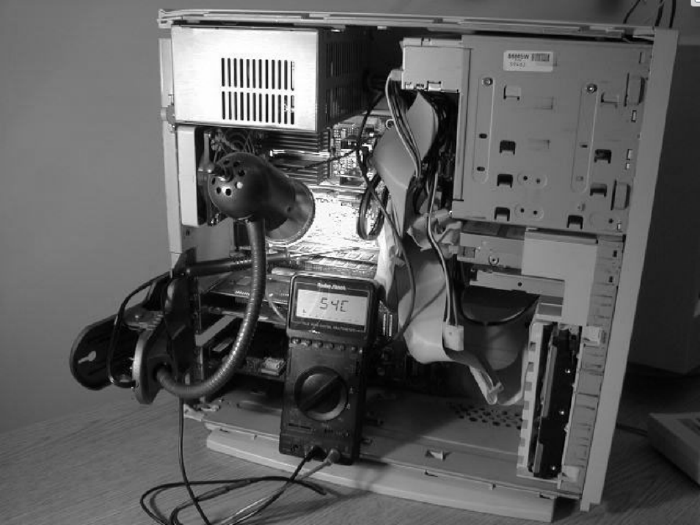
The lamp is heating up RAM to provoke working conditions causing errors
A public private key
In the case of computers, unauthorized access or control over an application can be obtained in many ways, and exploiting memory mistakes is only one of them – and let’s admit, a somewhat sophisticated one. There are, however, uses for which this attack vector is one of the few effective or even possible. We are talking about all kinds of devices where, at the hardware level, certain address spaces of RAM or non-volatile memory are protected against reading, and where the attacker’s goal is precisely to extract a secret – e.g. a private key.
Crackers breaking chip security use all sorts of ways to make memory cells change state: they lower clock frequency, heat up cards, provoke short circuits or brief voltage increases on inputs, and even bombard circuits with radio waves. After many attempts, they manage to disturb the operation of an embedded subroutine and force it to generate a dump of part or all of the memory that normally cannot be read.
A DNS experiment
Let’s return to single-bit faults in RAM that allow cybernetic wild tenants to occupy the right names. How often do they happen, and how popular must a domain name be for it to pay to register similar ones, differing by only one bit?
Instead of using statistics and theorizing, it is best to run an experiment. Artem
Dinaburg did so: in 2011 he registered about 30 names, starting with ikamai.net
(originally akamai.net), through microsmft.com (originally microsoft.com), and
ending with doubleslick.net (originally doubleclick.net). All were served by
a dedicated DNS server and pointed to the IP address of a web server running on the
same system.
After seven months of tests it turned out that single-bit mistakes happened on average 59 times per day for the 30 tested domain names. Interestingly, some operating systems turned out to be less susceptible to errors than others. For example, Mac OS X, compared to the overall statistically measured popularity of HTTP queries, had significantly fewer “slips.” It was also observed that most faults occurred in client stations or proxy servers (96%), while only 3% occurred in DNS components, and about 1% in other places.
Attack vectors
In April 2013, Jaeson Schultz of Cisco presented variants of bitsquatting attacks that exploit the fact that particular symbols used to indicate a destination have different meanings depending on context.
Mistakes in domain name separators
According to RFC 1123, a domain name can consist of upper- or lower-case letters of
the Latin alphabet without diacritics and special characters, except the hyphen
(-). A permissible separator that separates parts of an address (domain names and
hostnames) is a dot. The attack consists in registering such names for which, as
a result of a single-bit mistake, the dot gets swapped with the letter n, or the
letter n gets swapped with a dot.
For example, the domain name www.randomseed.pl may be changed into the domain name
wwwnrandomseed.pl, while the name zaufanatrzeciastrona.pl may become
zaufanatrzeciastro.a.pl.
Mistakes in URL path separators
These are errors in the part responsible for the path of a Universal Resource
Locator – everywhere a slash (/) appears. Due to a fault, it may change into the
letter o and vice versa.
An intruder can then count on shortening the address if the letters before the o
are a valid top-level domain name. For example, i.plo.net changes into i.pl/.net
and points to a page operating under the name i.pl.
Mistakes in URL anchoring markers
URL strings may contain the hash symbol (#), which separates the domain name and
path from the label name, also called an anchor (anchor). Using it allows one to
specify which exact fragment of an HTML document’s content the visitor means – i.e.,
the place the browser should jump to after loading the page.
In mistakes of this type, the # character can be swapped with the letter c (or
vice versa), and trouble appears when no path is provided (the label marker follows
directly after the DNS name). If that happens, we may expect, for example,
www.pl#.com (domain name www.pl) instead of www.plc.com.
Mistakes in URL schemes
An interesting fault is swapping / for o (and vice versa) in the URL scheme or
the letter directly following it. It only seems unusable, because even a mistyped
scheme is “corrected” by browsers to increase comfort. For example,
http://randomseed.pl/ may be changed into http:/orandomseed.pl/, which will cause
the request to go to the site under the name orandomseed.pl.
Similarly, for domain names starting with the letter o, a bitsquatting error may
turn it into a slash, and the browser’s correction mechanisms will treat the scheme
of the URL string as mistyped; for example, instead of visiting http://ovh.net/ the
user will visit http:///vh.net, i.e., connect to vh.net.
Internal domains
Companies often separate internal networks from public subnets, and for convenience (especially in larger enterprises) they run internal domain name system servers.
An employee who wants to use an internal project management service can connect to it
by entering an easy-to-remember name in the browser’s address bar, e.g.
http://projects.internal. Here .internal is an internal top-level domain, and
projects is the hostname on which the web service runs.
If a bitsquatting error related to the separator occurred, the browser could direct
the user to the address corresponding to the locator http://projects.inter.al, so
instead of the internal server the user could accidentally log in to a fake site
imitating the one operating on the intranet.
Applications
Not only the contents of websites are at risk from bitsquatting attacks, but also any other data fetched while specifying its location using domain names. Examples include computer programs or updates that a potential attacker can replace with their own versions containing, e.g., a trojan. Such a scenario is very plausible, because update servers – due to popularity – often use content delivery networks (CDN).
Protection
The first line of defense against accidental changes to data stored in memory are the already mentioned built-in hardware correction mechanisms based on checksums. Unfortunately, systems using them (so-called ECC, Error-Correcting Code) are not standard equipment in most consumer devices. Besides, their use is associated with a noticeable drop in performance, and to provide a computer with proper protection one would have to replace not only RAM, but also hard drives, controller cards, and other components that handle data at high speed.
It may be comforting that a certain barrier against already distorted information are interface controllers (USB, SCSI, PCI, etc.), which use their own checksums. If a fault is detected, the component participating in communication will be asked to retransmit, or an error will be raised. Unfortunately, this protection does not extend to single-bit mistakes in memory, which are what bitsquatting relies on.
From the software side, the general problem of single-bit faults can be addressed by using digital signatures or checksums for interprocess communication messages, as well as blocks of important data stored in memory. Additionally, at the operating system or standard library level, appropriate correction and/or redundancy mechanisms would have to be introduced, e.g. re-fetching data into a buffer if an integrity violation is detected.
Getting ahead of bitsquatters
When it comes to domain names, one workaround is registering all those that can be accidentally chosen. Unfortunately, this will not help much if the corrupted variant of the used name has already been taken by someone else.
Diversification
Another way is distributing traffic among many names within the owned domain (all
of them can even be served by one server). This is not a good solution for a single
website, but it is perfectly feasible for a service provider with many
customers. Diversifying the DNS space can make a targeted attack – based on the
attacker buying many names – unprofitable due to their large number. To make mapping
harder, one can also spread the names across different DNS servers and use CNAME
(canonical name) records.
Changes in applications
Designers of web applications or other programs communicating over the network can also minimize the risk of single-bit mistakes in names influencing how their systems work. It is enough if they reduce the number of places where a DNS name or a full resource locator is stored in memory.
Not only serious changes in data structures and algorithms can help, but even simple tricks such as changing absolute links to relative ones or changing some letters to uppercase (it does not matter for correct DNS resolution, and an uppercase letter – having a different ASCII code – may have fewer or even no bitsquatting counterparts that still fit within the allowed alphabet).
Client-side DNS corrections
And what about the end user, the netizen? They also have some room to maneuver in
terms of protection. For internal services, or even frequently visited public
services, one can try adding their distorted domain names to the /etc/hosts file
(Unix) or %SystemRoot%\system32\drivers\etc\hosts (Windows) and associate them with
the correct IP addresses, or with the loopback address (127.0.0.1). A problem may
be directing traffic to the “proper” addresses mentioned above, as it requires the
user to know which IP address is correct at a given time (or to refresh it). For
larger, dynamic services one can instead block the distorted names by mapping them to
the loopback address.
SSL certificates
A certain practical protection – requiring cooperation between users (or rather, the applications and operating systems they use) and the providers of applications and services – is to employ encryption and digital signing of data.
In the case of web services, server administrators – besides enabling SSL/TLS – can set the HTTP Strict Transport Security (HSTS) header, which tells the browser that it should connect to the given site only using a secure transport layer. Of course, the server certificate should come from a trusted authority.
Digital code signing
The counterpart of the protection method described above, in the case of applications downloaded from the Internet, is digital code signing. In such cases, even if it happens that the program comes from an accidentally chosen source, it will not be launched if its digital signature – or rather the public key associated with it – is not certified by a trusted certifying body.
-
Simonite, T. “Should every computer chip have a cosmic ray detector?”
New Scientist, March 2008. (Archived.)
https://web.archive.org/web/20160321051937/https://www.newscientist.com/blog/technology/2008/03/do-we-need-cosmic-ray-alerts-for.html ↩︎ -
Dinaburg, A. “Bitsquatting: DNS Hijacking without Exploitation.”
White paper, Raytheon Company, Waltham, MA, July 2011.
http://media.blackhat.com/bh-us-11/Dinaburg/BH_US_11_Dinaburg_Bitsquatting_WP.pdf ↩︎ -
Evans, D. “The Internet of Things: How the Next Evolution of the Internet Is Changing Everything.”
Report, Cisco IBSG, San Jose, CA, April 2011.
https://www.cisco.com/web/about/ac79/docs/innov/IoT_IBSG_0411FINAL.pdf ↩︎